




Edheres
Member
-
Joined
-
Last visited
-
Thanks - I'm rooting around for the best replacement for the hard reset, but still not working T95.
-
Still going. "Acme" from here was helpful and indicated he was going to stop by, but didn't. I was able to hard reset the T95, but it's shot so I'll need to replace it. Thanks for asking,
-
Sadly, United being both a legacy airline with a long history and a U.S. Airline to boot, these flights to popular destinations tend to be populated by the oldest and most surly flight attendants on the planet who use their seniority to grab the flight and do the bare minimum on what's essentially a shopping trip. I used the fly United several times a year between Shanghai and the States and gave it up for younger, more attractive flight attendants willing to work for their living.
-
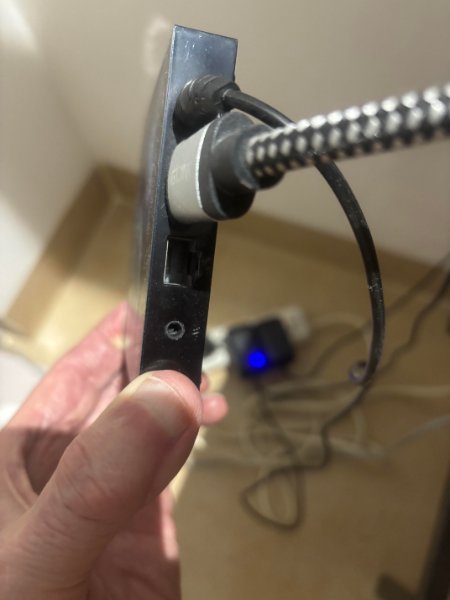
Regarding the HARD RESET: There is a small pinhole on the back of the T95. I do not get any vibration or reset menu when unplugging, replugging and depressing anything inside that pinhole following your instructions. You're certainly welcome to give it a go if you can stop by. I'm in the Condos of what was called the Centara before the Chinese conman in Singapore lost the building and a lot else with his arrest. You're right - it's directly across from the ne Avenue Boutique sales office.
-
On the Soft Reset: I can go to SYSTEM and get a REBOOT option. However, It has a message "Attention: This feature has been removed from the APP Starter hold "Enter/Select" button + "Play" button to restart FIreTV." My controller does not have a "Play Button."

-
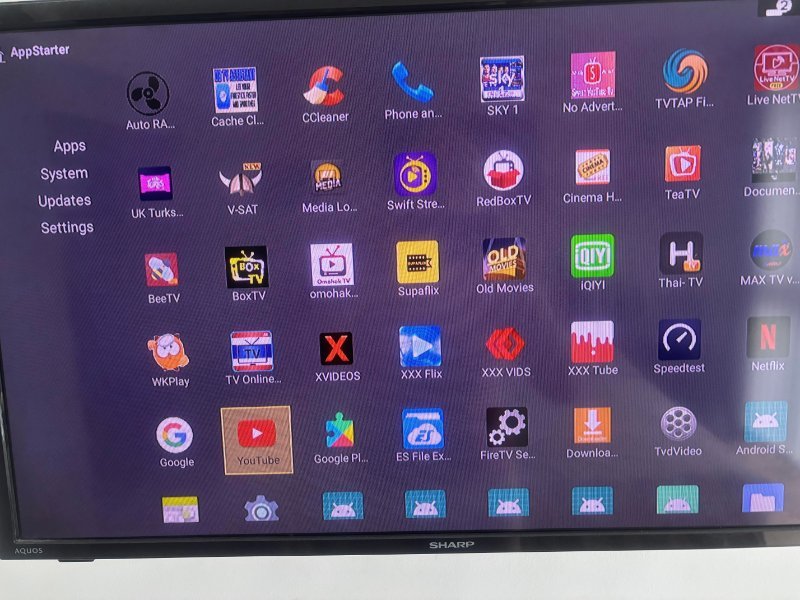
Still can't get Google Play/Store to load.Right.........there are three (3) icons on the T95 App Screen that are marked "Google Pl..." One is a puzzle piece. None of them do anything when I select and click on them. I was able to verify on my laptop that I am logged into the T-95, but that's all.Scud missiles haven't appeared - neither have Drones. First I lost access to "Sky" and "Sky News." more recent;y to YouTube which appears on the App screen (see attached), but just loops back to the App Screen Icon and never starts. Same result with a screen freeze when trying to install YouTube. Most other Apps aren't working. The guy who installed the ting and sold it too me was fixated on porn, so there are plenty of porn Apps about which I could care less. Thanks
 Have an Android T95 Box installed about 5ive years ago. Hopelessly out-of-date and out of my skill set. Looking for on-site, turn-key fix for cash.
EdNot partial to technology, brand or color. I just need some smart individual to come to my door, spend less than an hour fixing the damn thing and going away with cash. Suits me fine.
Have an Android T95 Box installed about 5ive years ago. Hopelessly out-of-date and out of my skill set. Looking for on-site, turn-key fix for cash.
EdNot partial to technology, brand or color. I just need some smart individual to come to my door, spend less than an hour fixing the damn thing and going away with cash. Suits me fine.


Account
Navigation
Search
Configure browser push notifications
Chrome (Android)
- Tap the lock icon next to the address bar.
- Tap Permissions → Notifications.
- Adjust your preference.
Chrome (Desktop)
- Click the padlock icon in the address bar.
- Select Site settings.
- Find Notifications and adjust your preference.
Safari (iOS 16.4+)
- Ensure the site is installed via Add to Home Screen.
- Open Settings App → Notifications.
- Find your app name and adjust your preference.
Safari (macOS)
- Go to Safari → Preferences.
- Click the Websites tab.
- Select Notifications in the sidebar.
- Find this website and adjust your preference.
Edge (Android)
- Tap the lock icon next to the address bar.
- Tap Permissions.
- Find Notifications and adjust your preference.
Edge (Desktop)
- Click the padlock icon in the address bar.
- Click Permissions for this site.
- Find Notifications and adjust your preference.
Firefox (Android)
- Go to Settings → Site permissions.
- Tap Notifications.
- Find this site in the list and adjust your preference.
Firefox (Desktop)
- Open Firefox Settings.
- Search for Notifications.
- Find this site in the list and adjust your preference.