




Harrisfan
Advanced Member
-
Joined
-
Last visited
Everything posted by Harrisfan
-
Lets say you have 12 judges scoring a dance. The contestants are wearing red and blue. 9 judges are blue biased and 3 are red biased. Which combined scores do you use to calculate the most accurate score?
-
How often do you wet yourself?
-
Ipsos is a lefty poll. You guys
-
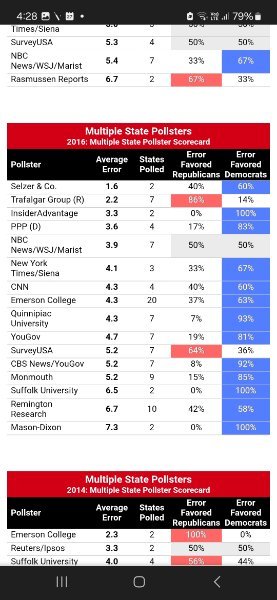
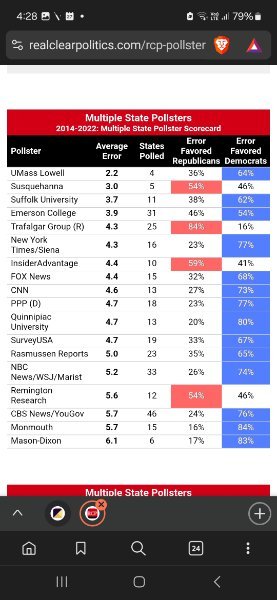
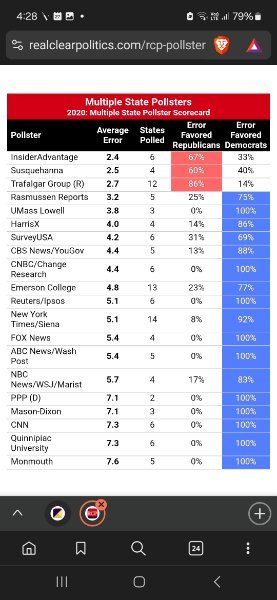
Years of data. The same bias is still there. I correctly predicted all 7 swing states using this. You guys had no clue. Years of Trump abuse and not 1 clue on the poll bias.
-
Then I would see a mirror
-
What is a bell end?
-
Money drives it
-
Ok little boy.
-
They need approval but tech geeks make it all happen
-
So funny you guys have no clue
-
Are you 2yo?
-
On their website
-
The current data is analysed using bias from 9 years. Then you know which polls to use silly
-
Why is it conservative leaning? More than 75% of the polls are left leaning lol
-
Tech has a bigger impact Phones Ride share Airports
-
Not really. 7/11, hotels, etc all the same. Uber now Grab has affected Thailand more than most things.
-
Cult talk. Have to laugh.
-
I have 9 years of data lol
-
I have Trump +4. He was +3.5 the other week. Same method that picked the last 2 elections.
-
RCP average is rubbish. Have you learnt nothing in 9 years?
-
Same as 6 months ago lol
-
Whats that got to do with Thailand?
-
None of that impacts on me.
-
I say very little boy.
-
Not really except for forex but that goes up and down anyway. Strong Thai baht has the biggest impact on all farangs.





