




lifeincnx
Advanced Member
-
Joined
-
Last visited
-
Two years ago one could book an appointment online up to 145 days in advance. Last year I missed that, and nothing was available 60, 45, or 30 days in advance. So I went in early, just like the old days but no middle of the night nonsense, and the process wasn't too bad. I was just hoping to avoid that mess again but it looks as though they are either forcing it or it is just a site FUBAR.
-
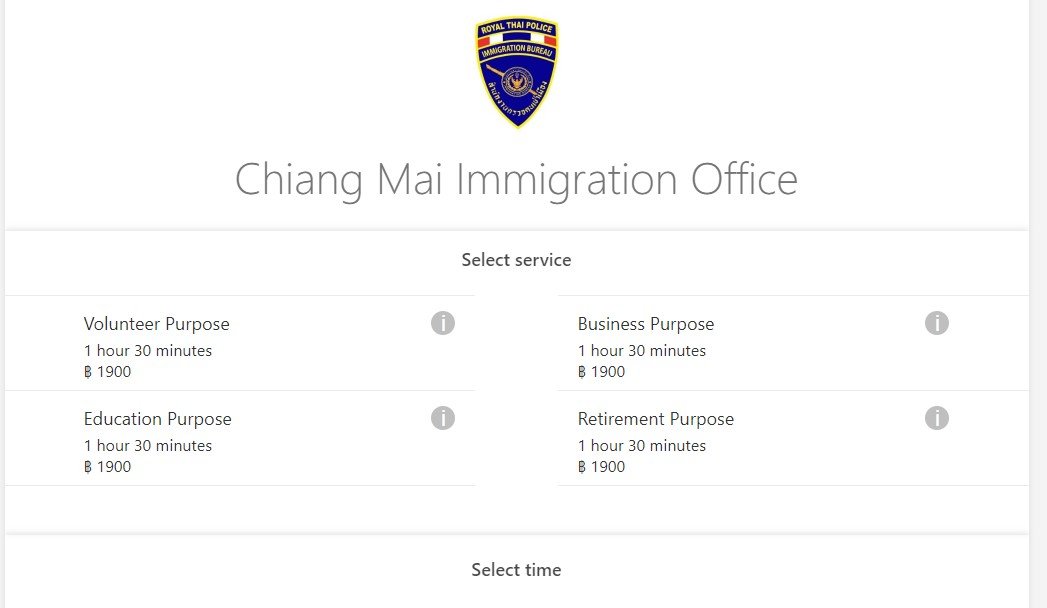
Just a heads up: I went online to schedule my Non-O visa extension/spouse 145 days in advance (45 before expiration and 100 before that). The Chiang Mai Immigration online appointment site no longer has a visa extensions for family (spouse/marriage) selection, only retirement, volunteer, education and business. So, I went to immigration and asked why. I was told all online spouse extension appointments are not available and have been booked A YEAR IN ADVANCE. I was given no other explanation, and there is no way for an individual to book a year in advance. Amazing Thailand.
-
If he was so lucky to get his wish and went back to the America where women couldn't vote, he would land right in the middle of Jim Crow America. The laws MANDATED racial segregation in all public facilities in the states of the former Confederate South, and many beyond. He has previously stated feminism was created by Satan, and "The only thing worse than a woman who doesn’t know her place, is a man who doesn’t know his." Back then, odds were he would end up swinging from the highest tree and folks would have enjoyed a picnic under it.



