StatlerandWaldorf
Member
-
Joined
-
Last visited
-
Thanks for taking the time to reply, it's given us a place to start. Very much appreciated.
-
Thanks for the replies gents, I really wasn't hopeful to get anything at all. I am not concerned about his ethnicity or any racism concerns, he is applying for Sandhurst anyway so any discrimination would be less likely.
-
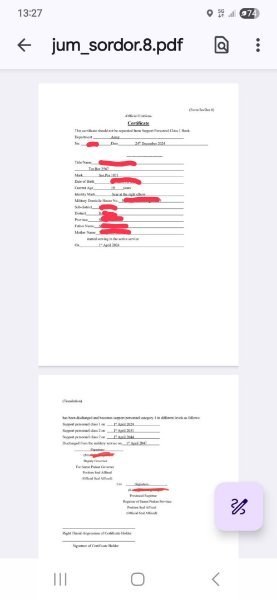
Hi All, My Son, dual (Thai/UK) is applying to join the British army, they understandably require proof that he is not eligible for Thai army service. He has completed ror dor and received the book (sor dor 8 ) but the translation seems a little ambiguous. It says he has been discharged and becomes support personnel category 1 in different levels. It then give 3 different classes (class 1, 2, and 3) with different dates in the future but with no explanation of what those classes mean. It then goes on to say 'discharged from the military service on' then a date in 2047. If anyone has any experience of this process, or has been through it I would appreciate any advice as I am not sure this will be sufficient evidence of exclusion from service in the Thai Army. Of course we will submit this document to the British Army but the wording of it makes it look like he could be called to serve at any time up to 2047. Note that in the picture it says class 2 twice, the last class should read class 3. Mistake on the translation. Help.