pauku1
Member
-
Joined
-
Last visited
-
That makes imported goods more expensive. Probably no good idea for a net-importing country...
-
Stay on topic, please. This thread is about Thb - not about Trump. My point: Thailand s relatively small economy might not be powerful enough to affect the "strength" of Thb vs Usd.
-
01.01.25 €/usd thb/usd 01.01.25 1.0267 34.290 19.09.25 1.1746 31.845 dif % 13% 7% This year the us-doller lost 13% on the eur This year the us-doller lost 7% on the thb it s usd-weakness, not thb strength! usd lost on most mayor currencies:
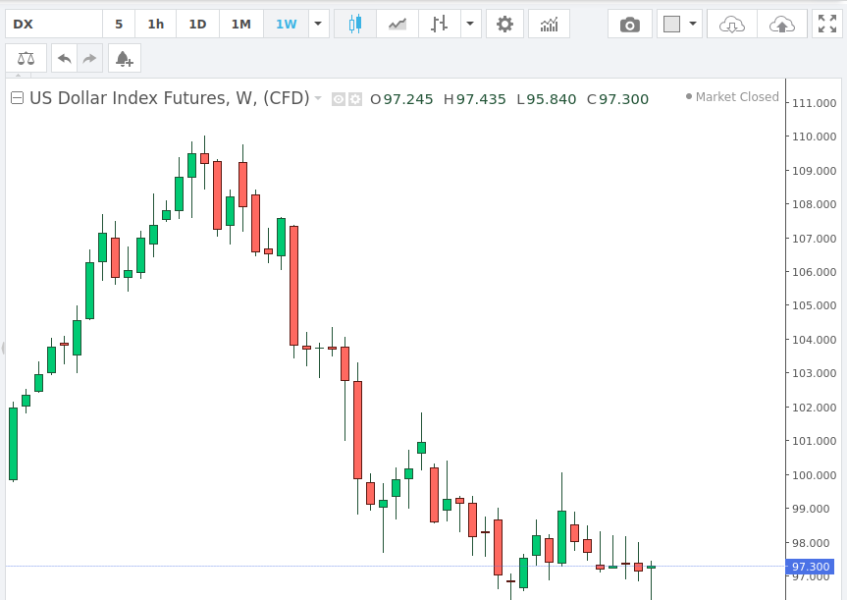
-
... they say less than 6 p per minute. https://www.vyke.com/rates/ vyke lowcost calls
-
After 1 year in service my Anern Hybrid Inverter shows strange behavior. Anybody know of a repair shop for Inverters? Preferably in Chiang Mai? thanks in advance: paulhttps://www.thaiembassy.com/thailand-visa/dtv-visa-thailanddream on...Here a small excell to play with the numbers..... taxel.xlsSaraphi Chiang Mai - retired over 65. - applied thai TIN 6 years ago - never filed tax-return Transfered more than half million THB in december, so decided to file. This Post was helpful: https://aseannow.com/topic/1316818-personal-income-tax-guide-for-foreigners-thailand/?do=findComment&comment=18613231 downloaded file from here: https://www.rd.go.th/english/63902.html small excell to compute and play the numbers: taxel.xls