




jasonr3255
Member
-
Joined
-
Last visited
Everything posted by jasonr3255
-
My Mothers Husband died in Thailand earlier this year. Both of them are UK citizens. I travelled to Thailand to collect the Death Certificate to bring it back to the UK where my mother lives. They were both still married at the time of death but separated for a number of years. He remained in Thailand on a retirement Visa until his death. My mother returned to the UK some years ago after they separated. Unfortunately his UK passport and bank books were lost. We believe he had funds in Bangkok Bank and my mother would like to know how we should proceed in trying to retrieve any balances that are still in his account. He did not make a will. Many thanks
-
Ok thanks for the replies 👍
-
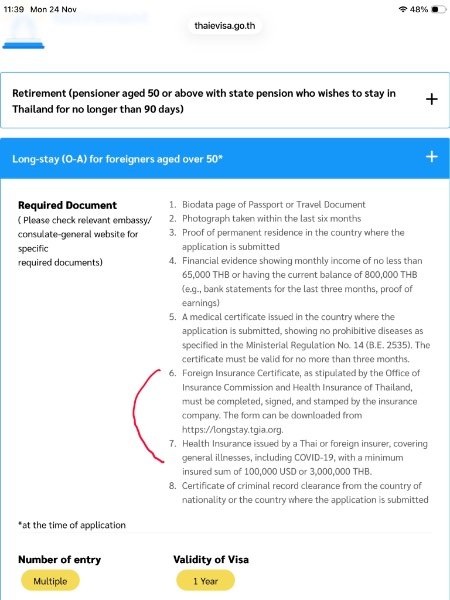
Hi, I’m looking to apply for 1 year O-A based on marriage visa, but I’m stumped on whether I still need to download number (6) and get the Axxa Thailand office to fill that in ? or does their health certificate once I’m insured mean this form does not need to be filled in ? just wondered if someone can clarify as I’m applying from inside the UK Many thanks
-
Anybody sent funds from their Bangkok Bank App back to UK bank account recently? Is it reliable ? Is there a limit on sending ? Does it require phone confirmation ? As I’m in the UK at the moment and thinking of sending 400,000 back to my UK account advice would be helpful Thanks