
lostintransit
Member
-
Joined
-
Last visited
-
I’ve done some googling and can’t find any agent offering to open Bank accounts for around 4000 THB. Do you mind sharing more information regarding this? I would really appreciate it. Thanks in advance
-
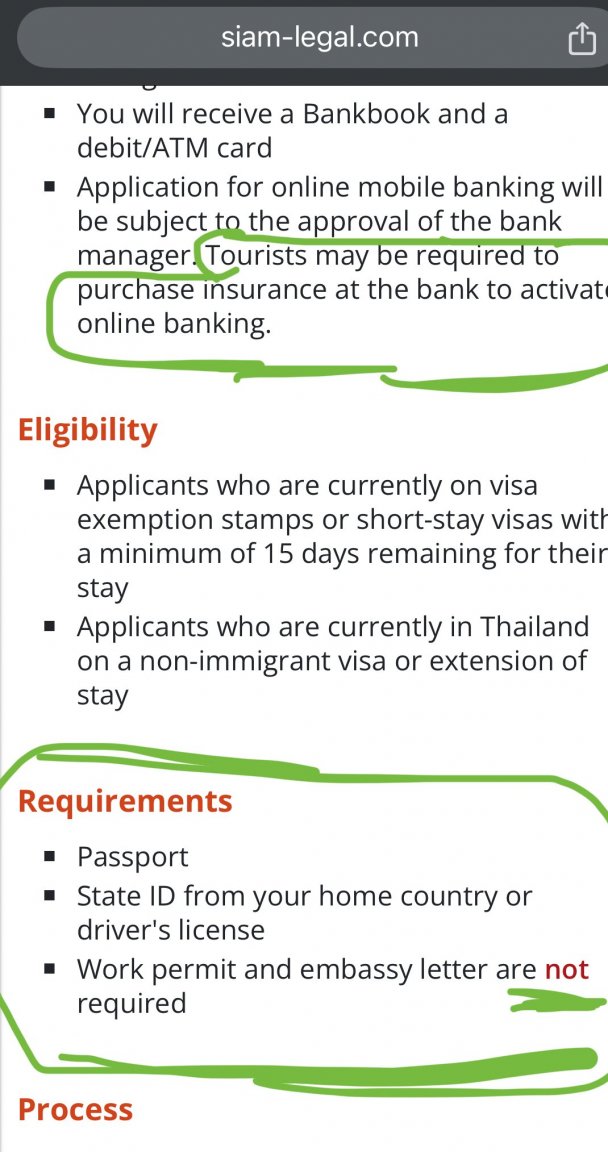
I believe couple of years ago Bangkok Bank had a package deal for expats who wanted to open a savings accounts. The package included: mobile banking, and health insurance. Now I can’t find this offer anymore on their website. But i can find some vague information on the website of siam-legal. siam-legal mentions that they can assist foreigners opening a bank account for a fee. This mostly applies to people who arrives on a regular tourist visa and are unable to obtain all the documents required. And that’s pretty much my situation. I’m not able to get a «embassy letter» simply because my embassy don’t send out letters like that.. and yea I tried to tell my embassy that I want to open a saving account in Thailand, and Bangkok Bank have everything they need from me except this “embassy letter” but trying to talk to my embassy is like taking to a stone. So I decided I will pay an agent in Thailand to help me out. And my I international travel insurance runs out in a couple of months. So if i could get both insurance and mobile banking from opening a savings account through Siam-Legal, that would fit me really good. So I’m basically asking if anyone here has any experience opening bank accounts through agencies in Thailand or if anyone know of better “deals” out there?