




Dezmo
Member
-
Joined
-
Last visited
Everything posted by Dezmo
-
Thanks again.... I did load the letter on Sep 2... it still in Processing stage .... hopefully one soon :)
-
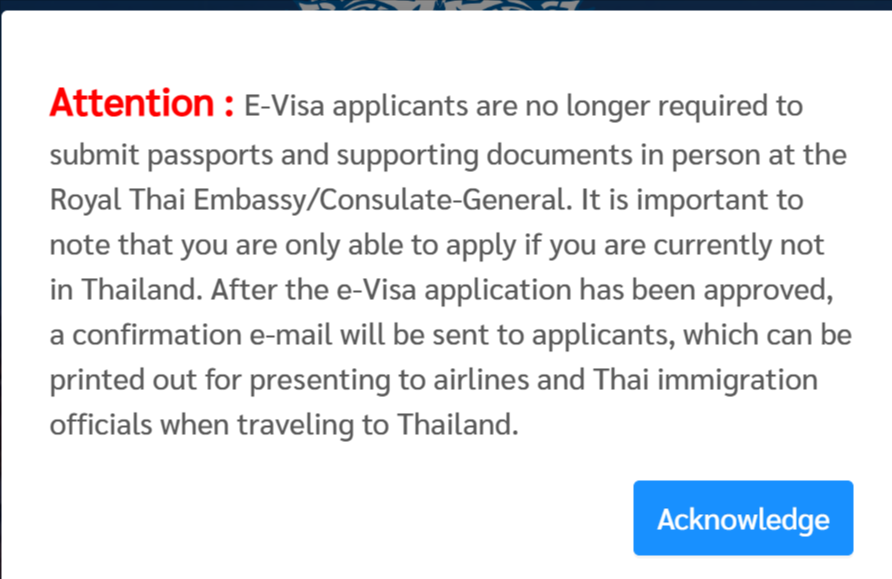
Thanks, I put in some info for flight, condo, etc. I did get to the Payment page, and of course Barclay flagged my MasterCard payment as fraud but I approved it 🙂 (at least it appeared to accept it as sometimes using overseas payment systems I have trouble with MasterCard and need to use my Visa). After having completed the online payment process, the applicant should receive a confirmation email together with an e-receipt. This process should take approximately 15 minutes. Alternatively, the applicant can download the e-receipt on e-Visa account which will also be available once the payment is successfully processed. It really did not provide any payment confirmation but sent me back to the Home page with this popup (below). But when I login I can download the payment receipt. The Barclay app does show a Temp Authorization for $1,600 so hopefully it all goes through. When I login again my application seems to be in "All Status" category and "Processing Pending Document Check (1) ". So I am assume I just wait now... I appreciate all the help.... seems they could provide a bit more instructions for this process 🙂
-
I received notice from BOI that they accepted the PDF of my Passport and the qualification letter was available. I then created an account on the https://thaievisa.go.th/ and started the process for the LTR but it has me select the NYC Embassy. Now I am on a page where it is asking me for my arrival and deprature dates and where I am staying in Thailand. So I am a bit confused if I am doing the proper process.....to get the LTR eVisa (not have to visit an embassy), and I do not yet have a flight plans nor hotel for Thailand. Do I just put in anythng here (flights dates, hotel, etc.) or will they ask proof on next steps? Wil they still issue the LTR eVisa here? I assume they will ask for the "notification of qualification endorserment" letter..... Thoughts?
-
Thanks, I may keep an electronic copy on my phone also (and several paper copies). They did email me for the latest passport pages in a PDF. I sent them the same PDF I uploaded a few weeks ago as I have not traveled yet they sent a vague email back saying the "PDF is not working" and instructions to "Scan the latest stamp and all passport pages in the form of double-page spread, ...". I just sent them the same PDF again as it was formatted properly. I assume they mean a 2 page spread...It as a little challenging and I just set it up in Word and copied in the scans side-by-side then saved as PDF. I assume the actual format is OK as they didn't complain when I first uploaded it. Maybe they had an issue with opening it this time.
-
Ah ok... impressed that is a pretty fast process... I started Oct 4 and had a few document requests since that time. Assume once I get the Visa, it will be paper that I need to print. Does an IO (at airport?) later stamp my Passport and also include a "Multiple re-entry permit " stamp? Or do I just need to keep the paper for all my travels...? Curious about a few things: --"Permission to work in Thailand (Digital Work permit)" - assume this is to work for a Thai company? Not that I would (though I may do some contract work for a USA company but I coudl to that anyway as before) but I had heard that if I wanted to perform some volunteer work (coaching, etc.) that I needed some type of work permit. Maybe this covers it? --"Fast Track Service at International Airports in Thailand" - I do not recall seeing these at BKK but assume they are marked and LTR holder can use them (or are there different "fast track" lanes)?
-
Now they emailed me and asked me to email them back my Passport pages. I had uploaded the same during the application but maybe this is a different department with no access to it. ? Kindly, send us for the all-passport pages in the form of double-page spread, Fingers must not appear on the photocopy, no cut off the photo. (merge into single PDF file) to this email. Kind regards, LTR Visa Unit
-
BOI emailed me: You have not completed the process on our website yet. If you choose to collect the visa oversea or Thai e-visa website, you will have to update the information within our website first in order to reach the complete status and obtain the letter of qualification endorsement to use on Thai e-visa website. So I chose the default NYC Consulate and now it says (Check Status): Document Review for Visa / WP Issuance So assume in a day or so the letter will show up so I can complete the process on the eVisa site 🙂
-
Thanks... I can wait a few days. Someone on the FB Thai Visa group said the same as you also.
-
Thanks, You would hope in 2025 there no need to physically go to an Embassy 🙂 I will wait a few days for BOI to reply before I select NYC 🙂 Hope you are correct 🙂
-
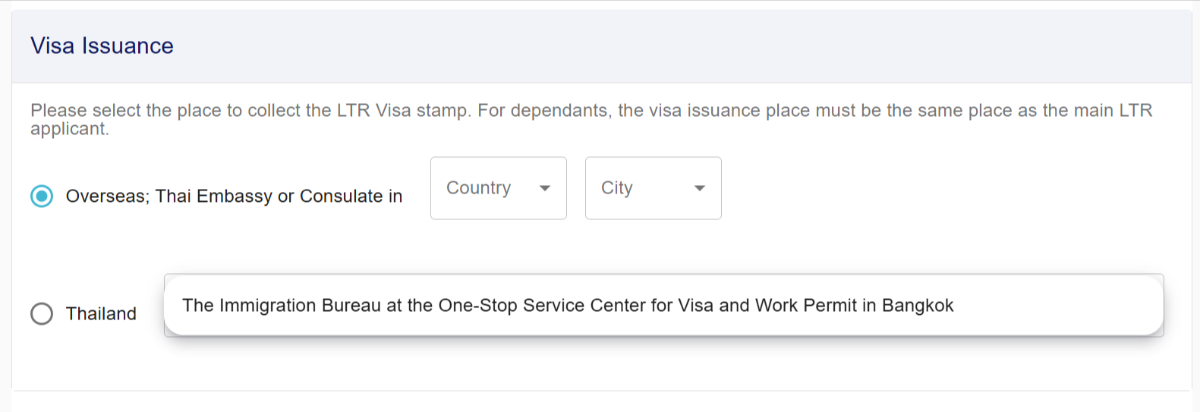
Thanks.. I do appreciate the recall as it has been some time for many here 🙂 If I choose Thailand button there is a list to select the type of Visa I am on now.. (but that does not apply). And nothign refers to eVisa. I do not see the eVisa option 😞 Hopefully BOI will reply and maybe "fix" it so I can use the eVisa system. It seems they are fine with all the docs i uploaded.. I do not see any request for more on Step 4. The last part of the email (which is very lengthy) says this: (But there is no obvious selection for me for eVisa.. unless i go to that website, create an account... but I do not have #4 below except the email...unless maybe they mean the unique Application number ?) For e-Visa Please submit the following documents via www.thaievisa.go.th Biodata page of Passport or Travel Document Declaration Photograph *taken within the last six months. If the photograph does not reflect your current appearance, you may be refused to enter the Kingdom of Thailand the Notification of qualification endorsement for Long-Term Resident Visa Other documents as required E-visa will be issued and be notified via email and your e-Visa account Later in the email it does say: E-Visa is available only in some Embassies/Consulates. To check if it's available in your area of residency, please go to www.thaievisa.go.th . Moreover applicant must apply for e-Visa via a specific Embassy/Consulate conforming with his/her consular jurisdiction and residency. The applicant is required to upload documents that can verify his/her current residency. So do wonder if I create an account there and proceed... but wonder if they know I am qualified by BOI by my application number.... or ???
-
Still looking for that letter - no attachment to the email or on the BOI website. Maybe I missed the eVisa selection during the process. Ugh I may not be in Thailand until mid-November.. so may miss the 60 day window 😞 To get yourself ready for LTR visa issuance. Please read the information and strictly follow the steps below. 1. UPDATE INFORMATION AND UPLOAD ADDITIONAL DOCUMENTS IN THE LTR SYSTEM Please be aware that the result for your LTR Qualification Approval will expire within 60 days of the date you have received the confirmation email.
-
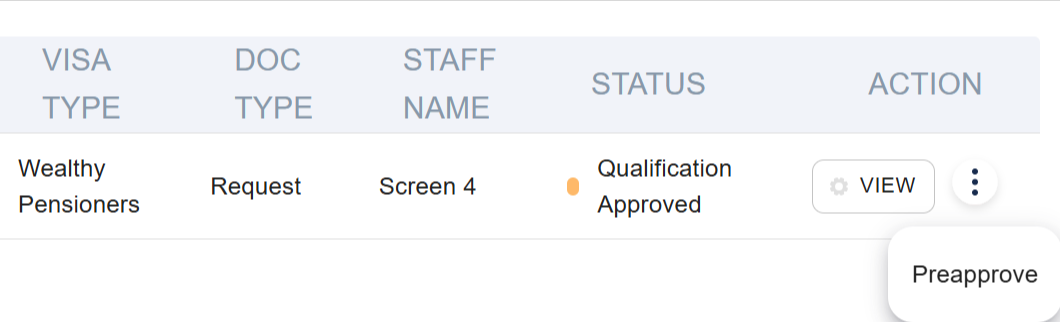
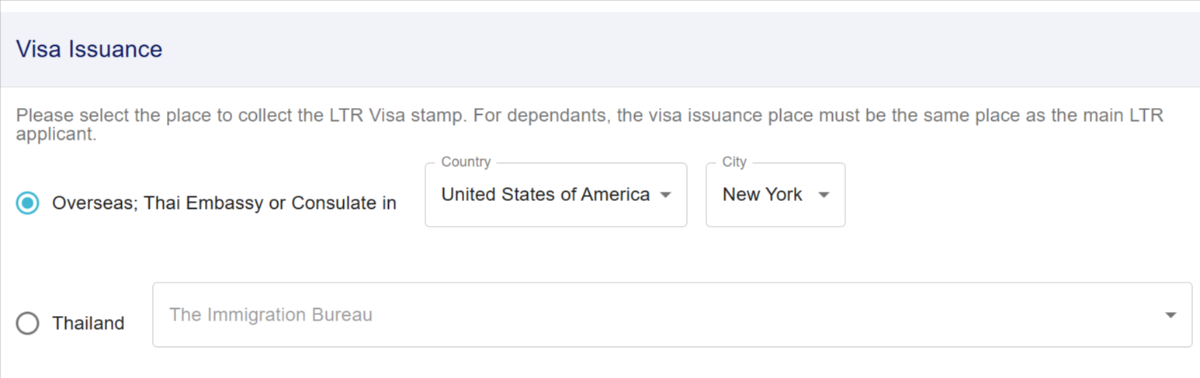
I see this and when I click the 3 vertical dots i see a "Preapprove" link. When I click "PreApprove" it goes to a LTR screen that shows my information pre-completed (above this) and: Then below that is has a screen for the TM6, etc. Latest travel information into Thailand And below this it lists all the documents I uploaded. I do not recall in the initial process it asking where I may get the Visa but would have selected EVisa if I saw it 🙂 I wonder if I selected something in error... hoping maybe they will reply via email and change it so I can use the eVisa system.
-
Thanks, I do not see any letter to download on the BOI site. When I login it says: Qualifications Approved LTR Visa application number LTRWP25080010 has been approved. Please upload the remaining documents and update additional information in order to proceed with the visa issuance And a button to Upload more documents that goes to a page that lets me choose an Overseas Consulate (it auto fills NYC for me) or Thai location. Then later on the form it requires TM6 (latest travel information, etc.). Maybe I just ignore this and use the Evisa website (but I do need that letter)..?? I did also email BOI to ask..
-
Today I received email: Your qualifications for LTR visa have been endorsed by relevant government agencies. And the BOI website says "Qualification Approved". (Wealthy Pensioners) The email is quite lengthy and a bit confusing on next steps mostly focused on visiting an Thai location. The link to the BOI website shows I have to complete more process there and indicate an Embassy in the USA (NYC for me) to finish the process. I thought that this could be completed electronically? Please select the place to collect the LTR Visa stamp. For dependants, the visa issuance place must be the same place as the main LTR applicant. But later in the email it states: For e-Visa Please submit the following documents via www.thaievisa.go.th Biodata page of Passport or Travel Document Declaration Photograph *taken within the last six months. If the photograph does not reflect your current appearance, you may be refused to enter the Kingdom of Thailand the Notification of qualification endorsement for Long-Term Resident Visa Other documents as required E-visa will be issued and be notified via email and your e-Visa account Do I create an account there (Thaievisa) and complete the process? I do not yet have any type of letter, etc for #4 (above) except the email (and I guess what is a confirmation number from the BOI website). I wonder if that is all that is needed for the process on the that website? Thanks!
-
I am still waiting in review... I wonder if they will pass me as my 2023 income was a standard income year (and very large due to some stock sales due to a company buyout or ours but it counted as income), but 2024 met the passive category 😉 They did ask 1099r as a follow-up for 2024. The instructions online during the application was surprising - asking for the last 2 years as the PDF I had read (see below) only indicated the past year. Wonder if I am rejected I can appeal 🙂 (Required-docs-Wealthy-Pensioners-30-06-2025.pdf) Official personal income tax return as filed to state authorities such as completion form of P.N.D. 90/91, BIR60, Form 1040, Form W-2, SA100, T1 General etc. showing income of no less than 80,000 USD per year in the past year or at the time of application.
-
I understand .... just was curious as one does not have to withdraw large sums after they get the LTR? I assume there is no yearly checkup on tax forms or 1099r to ensure the 80k each year? What about at the 5 year mark?
-
Curious that they only ask last 2 years of passive income for WP..... and not want to see the IRA, etc. from which the income may come 🙂 One could meet the 2 yr requirement but then later maybe not withdraw/earn the $80k..... maybe get part time job, etc...
-
Ah that is true.. and Social Security (in USA) does not count as passive I assume (I forgot)....
-
I am surprised the totals are so low since 2022.. The LTR seems a good deal and nice perks compared to the O or OA.... I really like multiple entry and no 90 day reporting 🙂 Wonder how fast the expidited line is too 🙂
-
Thanks, 2024 I had some unemployment income but if they subtract that out (or pay attention to the line items) they will see that my "passive" income (IRA withdraw, interest, etc.) still exceeded the 80k threshold 🙂 (I thought thats why they asked for the 1099r before 🙂
-
Thought I had passed the income step prior after uploading the requested 1099r forms (I had loaded the 1040 tax forms for 2024 and 2023 prior) but today they requested 2024 Tax form so uploaded my entire Fed and State forms. Assume they look at Adjusted Gross to meet that $80k threshold (which I exceeded easy) and not the Federal Taxable income (which is just a hair under the $80k). Please provide 1040 full form with transcript or NOA of year 2024. Please note documents must be merged into 1 file per uploading transaction.
-
Thanks... interesting they posted "Consideration by Govt Agencies" each time after I uploaded each document - initally and then after they requested the 1099r and now the insurance. Must be step by step 🙂
-
They asked for insurance documents again several times. I loaded all I had from AXA so hoping that is ok now... it shows term and payment. Now waiting... "Consideration by Gov Agencies" . Aside form 1099r they asked for prior and I supplied, I am hoping this is good news on processing 🙂 as I had loaded all other stuff properly.
-
I am guessing it has to do with the version # (when account created) and platform (IOS, Android).... ugh... they should fix it!
-
But that is for allowing others to add me, not me adding other I am trying to use Search to find and add others (they give me either name or phone)... Sometimes neither works....


