




timbothaivisa
Member
-
Joined
-
Last visited
-
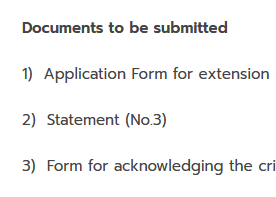
Thanks everyone. From the link I provided, item #3 is form STM2 So that still leaves the 3 items referred to in #2 outstanding. I saw elsewhere that I need to take a letter from the wife, so that could be 1 of them, and I think there's another form for accepting the penalties for overstay etc - so that still leaves 1?
-
Looks like the requirements have been stiffened since I last looked at this. https://bangkok.immigration.go.th/en/visa-extension/#1610937437663-90b1feab-b48a Can anyone shed any light on item #2 please - "Statement (No.3)"?
-
probably because Thais are used to a grazing schedule, whereas westerners tend to ritualise with times, permitted food types for each meal, portions, my-plate-not-yours etc. thus when the topic of food arises, we start umming-and-ah-ing and a load of superfluous debate ensue - all of which probably seems like a total wind-up to someone who's been doing it differently all their life
-
thanks everyone - sounds like it's in our favour after all 😄
-
she's being "greng jai" 😏 (about them, not me lol)
-
I'm happy to oblige if the need is genuine, but nobody seems willing to convey or pre-empt my instinctive response: "why?" Obviously wifey just wants to get on with it, and (like many Thais) doesn't share my natural skepticism about surrendering ID without at least a good reason. Any ideas? 😶
