


Skip to content
View in the app

A better way to browse. Learn more.

Thailand News and Discussion Forum | ASEANNOW

A full-screen app on your home screen with push notifications, badges and more.

To install this app on iOS and iPadOS
  1. Tap the Share icon in Safari
  2. Scroll the menu and tap Add to Home Screen.
  3. Tap Add in the top-right corner.
To install this app on Android
  1. Tap the 3-dot menu (⋮) in the top-right corner of the browser.
  2. Tap Add to Home screen or Install app.
  3. Confirm by tapping Install.

SplitInfinitive

Member
  • Joined

  • Last visited

  1. None I can see, I used the magnifying app on my phone for a close look.
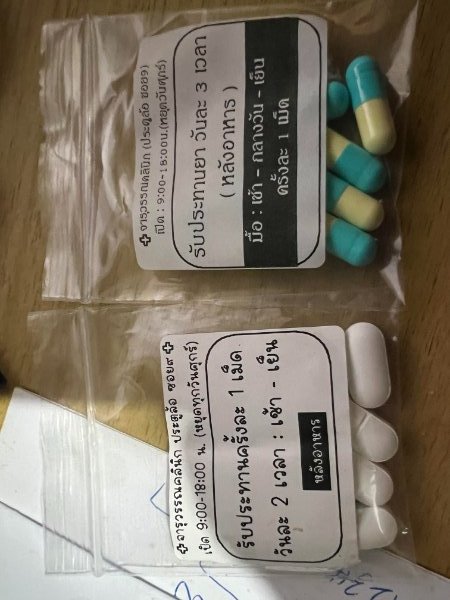
  2. OK, thanks for the prompt relies, I had the "Take" stuff worked out, I just wondered what they were. They are for me, wife picked them up from the chemist, some sort of urinary track infection. Definitely not an STD, my money would be long standing catheter damage.
  3. I know that at least one is an antibiotic.
  4. Can anyone tell what these are and what they are usually taken for? Google Translate squibbed out. Sorry, I thought I'd rotated them but AN said no.
Account

Navigation

Search

Search

Configure browser push notifications

Chrome (Android)
  1. Tap the lock icon next to the address bar.
  2. Tap Permissions → Notifications.
  3. Adjust your preference.
Chrome (Desktop)
  1. Click the padlock icon in the address bar.
  2. Select Site settings.
  3. Find Notifications and adjust your preference.