





hotchilli
Advanced Member
-
Joined
-
Last visited
Everything posted by hotchilli
-
Which is about how far behind the times Thailand is.
-
Proof that it had not been done before, or the manager only had to ask to see the latest maintenance check list?
-
Ignore the red flags at your peril... doesn't just apply at the beach.
-
Nice fella... not.
-
Kind-of.
-
Ahh yes the cure for all sins... and my missus says I don't have any faith in the local temple?
-
Desperately trying to save face and blame anything that they can. Why not just come out and say if she didn't use it it wouldn't have happened at all?
-
Too dangerous... the heat won't kill you but the drivers will.
-
1] Thousands 2] Greed
-
They have some?
-
Got it...
-
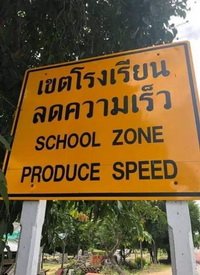
I've seen Thai signs...
-
Why things are different here
-
Thou shalt not steal jobs.
-
Maybe TAT should drop the 300 baht entry levy and ask tourists to donate a pint of blood. They could then donate said blood to the hospital for a small handling fee.
-
Another nutter on the loose.
-
Good luck.
-
Very tragic, a young educated life lost... RiP
-
A very sad looking Hyena.... they should be set free where they belong.
-
At least he didn't take anyone with him....
-
10 million baht in damages?
-
Not paying attention syndrome strikes again.
-
You can't make a silk purse out of a pigs ear.
-
The sun shines and the food is good.
-
Die hards.... that's where. From people who have nothing better to do




