



.jpg.8727108792c8cdee7e98b8b03c639ef6.jpg)
Will Iam Not
Advanced Member
-
Joined
-
Last visited
Everything posted by Will Iam Not
-
Because it is the only way I know to get me to where I want to go safely, and with an accurate arrival time. And believe it or not, it is always EXACTLY correct. How do you read a 'good old map' whilst driving safely. Google Maps is great for finding somewhere once you get to the town/city/village/countryside view.
-
That's right, pollute the land with a bit more chemicals, and cut down more trees with which to make the paper tissues, which will probably be discarded to block the drains, or burned. Soap & water and the bum gun are good enough for me! 555
-
So you are saying that if an expat 'lost' his 800k in the bank for some reason, they should be able to IMMEDIATELY replace it, or leave Thailand. The Immigration Law says that if your bank funds drop below the required balance FOR ONE MOMENT, then their Extension is invalidated.
-
Ah, the Thai way.
-
I understand completely how to use a map, be it GPS or the old paper type, and always navigate to where I want to be. Most of the time Google (and other maps) simply show YOUR position on the road you are currently on and only tell you when you need to turn. I have more important things to get me annoyed.
-
You use G Maps as you want to, I am happy with the way mine functions and the way I use it.
-
Not alright. Please explain where I have missed the points. PM if you want to.
-
Please explain why the OP asked about Road Numbers, I take it while he is driving, is not classed as 'live navigation'.
-
I DO NOT need to look at Google Maps. A nice lady tells me exactly which way to turn. And there is an indication at the top of the screen telling the future turns. You can then zoom in or ask more when you get to your destination. Or download the information in advance. Love Google Maps.
-
The screen on your phone probably will not accommodate all that data so will only show the road numbers when zoomed out. Anyway, why not take note of the signposts with road numbers every kilometer. And of course, at intersections (road junctions in English).
-
Look at the signposts. 555
-
LED bulbs should not get hot enough to burn you, or melt any glue. I have many standard globe shaped bulbs, which I have fitted into the old downlight fittings so only the round part is showing. They are RGB WiFi controllable to any colour or brightness you want, can be programmed to turn on and off as wanted, and four of them on 10% are plenty for my large lounge, 2 for bedroom, and virtually invisible. Less than Bht 200 each on Lazada. No problems with them at all in three years. I

-
What a good example! 555
-
I am on CDs now! 555
-
I am a very chilled 75. Too young? 555
-
Or do you really mean it is better to s..g one girl in each of 40 different countries than 40 in Thailand? Hmmmm.
-
Yep, only need what I said previously, Bht 400 in bank and 35k per month. You couldn't live in UK or USA or Oz on that. Oh, and Bht 60 for a 620ml beer.
-
Here's me thinking Sushi was Japanese. Cold rice & raw fish........yuk! No good Balti or Mexican restaurants there?
-
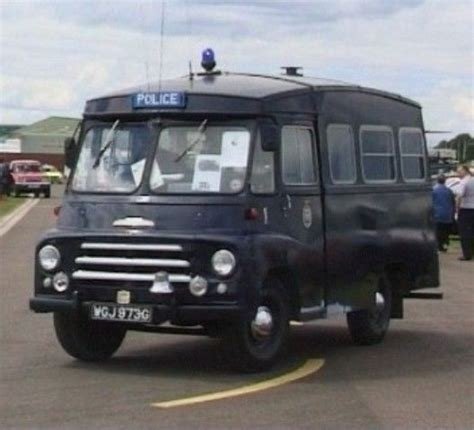
And this is what we had/still have? 555
-
Especially a lot of the Brits on here! 555.
-
And now down to 22. Bring on the holidays
-
Cockpit?
-
I am no fan of the Bangkok Police! 555. Sorry, I bet you've heard that before!The micro-breweries are good in UK, but most girls are munters!
.thumb.jpg.b2b4abaf9da630abc11cda7dc8d87eb2.jpg)






