DineshR
Member
-
Joined
-
Last visited
-
A related question to this. If SSA payments are directly deposited into a Thai bank account, I assume the amount is deposited in Thai baht. What exchange rate is used for the conversion into Thai baht - is it converted by the sending bank or the receiving bank ? And I assume it is tied to the market rate on the date of transfer. Curious to know this since I take SSA payment in $$ in my US bank but I only transfer when the rates are favorable. I know sending bank rates are very poor and receiving bank rates are much better.
-
…
-
Similar to the earlier posts, I applied for the LTR in late March this year. I ultimately had the LTR visa stamped in my passport in early June. I could have done it by mid May but I was traveling and had to wait until I got back. (1) No need for an agent - easy enough to do it yourself (2) uploaded 2 years of tax returns as well as all 1099’s to show the required amount of passive income (3) edited returns and 1099’s to remove social security numbers as well as account numbers (4) I have health insurance with Allianz International that met BOI requirements. (5) No problems with receiving prompt replies to all my inquiries. After the fact, I learnt of the LTR LINE account which gets you even faster replies to all your queries (6) 2 key reasons for getting the LTR visa - no worries about being taxed on funds transferred into Thailand and because I travel frequently during the year , I will never need to go to immigration office at all nor fill out the yearly notification report (the 90 day report which for LTR is done annually only if you stay continuously in Thailand for a year). Essentially, I have no reporting obligations for the next 5 years. In 5 years, I will need to confirm I meet all LTR requirements and get another 5 years. For 10 years, your cost of 50 K translates to 5K per year close to the 3.8K per year for the standard retirement visa that includes multiple re-entry permits. In my opinion I think it’s a great deal. Good luck.
-
When you book online and pay for breakfast, they usually charge you a lower rate - in your case, 200 per person. But if you pay at the hotel, they charge you a much higher rate - in your case 450 per person - for 3, that's 1350 per night, and for 2 nights, that's 2700. Had you paid for it upfront when you booked, it would have cost you 1200 baht (200*3*2) All booking portals and all hotels pretty much play the same game ...
-
@503726 yes, it was within the 7 day period. I have printed it out.
-
Just to follow up ... I was just able to do it. Seems like you don't need to fill in anything on the form other than to select the accomodation and click search. It then gives you all the entries for that accomodation. Problem solved.
-
Hello, I have previously submitted a TM30 notification over the past few years with no issues. However, after a trip today, I filled out the usual information into the website and submitted it. However, I am unable to now print this document. When I search for the submission, it says, "data cannot be found". Is anyone else seeing this problem ? Thanks for any advise in advance.
-
Over the years I have had a Thai driving license. When I first got it and through all subsequent renewals, I have had to show my drivers license from my home country. I am considering not renewing my home country license going forward but was wondering if this will impact my ability to renew my Thai driving license. Your advice appreciated. TIA
-
Just to clarify after re-reading both your posts. Yes, that is correct. You do not have to fill in any TM6 info since they stopped issuing TM6's at least a few years ago. Just leave it blank if it is on the form.
-
There are no more TM6's. So, there should not be any data related to a TM6 and no need to fill that in.
-
@2_mike_an I do not know the answer to your question. Perhaps someone on this thread may be able to provide an answer to your question. That said, I presume, that since you have been here for more than 10 years without leaving the country, you probably do not have the TM30 from 10 years ago. I assume, but do not know for sure, that you can simply create a new TM30 with a start date of whenever it is you create the TM30, and submit that when you apply for your 90 day report. If you currently have a TM30, simply make several copies of that and keep them for the next times you do a 90 day report. I believe that once you have done a 90 day report in person, all subsequent 90 day reports can be done online which may not require a TM30.
-
@2_mike_an According to the law as it is written, if you leave the country and return to the same address where you had previously submitted a TM30, then you do NOT need to submit one again. Remember it is returning to the same address where you previously filed a TM30. However, if you return to a new address, then you will need to file a new TM30. This is what the immigration rule states. However, I have heard via this forum, that not all immigration offices are following this rule even though this is the law. Personally, since I know how to do it and it doesn't take me more than 5 mins to do it, I do it every time I come back from abroad and print out a new TM30. I use this only if I have to go file an extension if my extension of stay is about to expire. I travel a bit so most times, I never actually use what I have printed. You only use the printed TM30 if you need to go extend your stay or do a 90 day report. If you leave the country before your permitted stay expires, then simply throw that away and do a new one when you come back. It's not a yearly thing. It's whenever you return to Thailand from abroad. It could be many times a year if you travel a lot or it could be once in a few years if you never leave the country for a long time. Just bookmark your TM30 page so it is easy to get back to if you need to do it again and follow the forum to see if there have been any changes since the last time you did it. Good luck !!
-
Once you have submitted your data as you have indicated, you need to go back to the search page. I do this by logging out and then logging back in. When you do this, you can then start a search . On that page to the upper right, you will see a block that says 'Date of Stay". In there fill in the from date as the date you submitted your data and then in the next field (to date)fill in today's date. Don't fill in anything else. Then go to the search button below and click that. If your data had been successfully transmitted earlier, you will see your data show up below. Click the blue magnifying glass icon on the bottom left and the data you submitted should show up. The you click the export button on the bottom right and your printable TM30 should show up. Print that for your records. As others have said, 7 days after you submit your data, this form will no longer be available. Good luck!
-
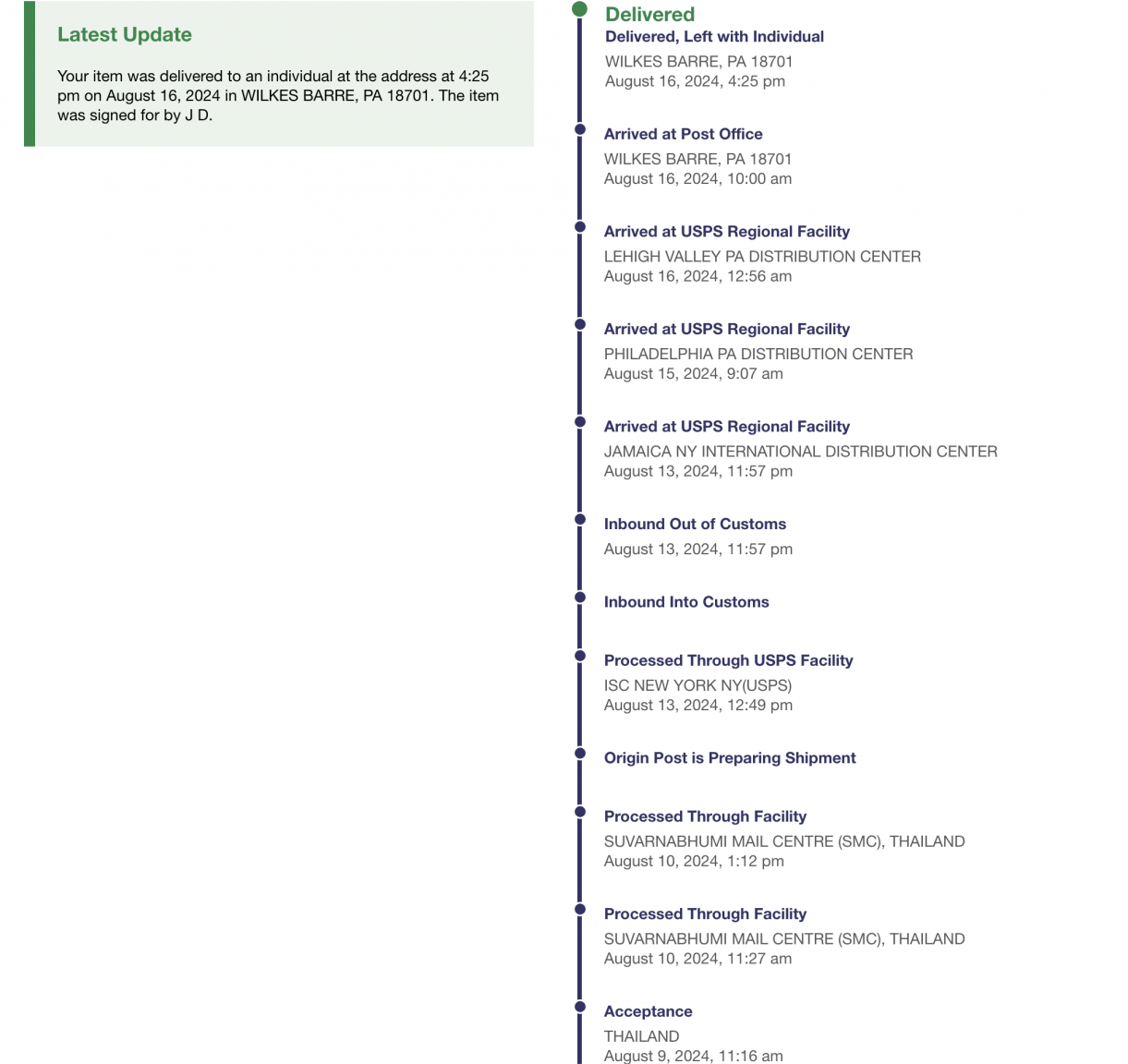
An update. I sent my 7162 via EMS (cost THB1550). Dropped at post office Aug 9 - delivered Aug 16 per tracking info attached. Took exactly a week.
-
@jeffandgop I went and sent it to the address you show via EMS though I did not use a courier service. I intend on sending a 2nd copy via regular airmail in a week. As of today, I have still not received Form 7162 from SSA.