
ballpoint
Advanced Member
-
Joined
-
Last visited
Everything posted by ballpoint
-
You too normally have impeckable habits, so it's sad to see you resorting to fowl comments, and all over a few poultry remarks I happened to make. I also find your KFC references to be in bad taste. Bringing back memories of my poverty ridden childhood. My father's idea of a treat was to take us there to lick other people's fingers.No, you're thinking of nuggets."A gentleman never motors about after dark." Joseph Lucas.Guilty on all counts...
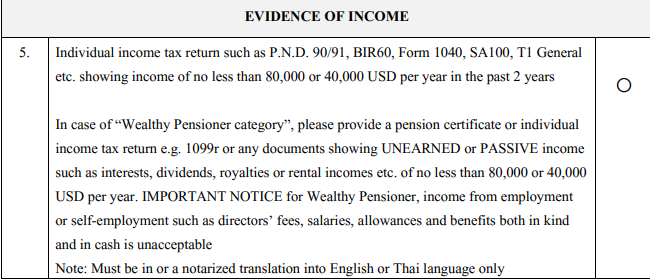
 Vacuum lift.mp4From the BOI site, it does appear that you are only required to show an income of at least USD80k for two years prior to applying, if taking the "passive income" route. Then, I assume, you'd need to do the same for your 5 year extension. So two years prior, and years three and four would need this income if that is the case. Required-Documents-for-Qualification-Endorsement-for-Wealthy-pensioner-16-03-66.pdf (boi.go.th)
 People who like rock music are rockers. People who like pop music are popsters. There's an awful lot of country music fans about.
Account
Navigation
Search
Configure browser push notifications
Chrome (Android)
- Tap the lock icon next to the address bar.
- Tap Permissions → Notifications.
- Adjust your preference.
Chrome (Desktop)
- Click the padlock icon in the address bar.
- Select Site settings.
- Find Notifications and adjust your preference.
Safari (iOS 16.4+)
- Ensure the site is installed via Add to Home Screen.
- Open Settings App → Notifications.
- Find your app name and adjust your preference.
Safari (macOS)
- Go to Safari → Preferences.
- Click the Websites tab.
- Select Notifications in the sidebar.
- Find this website and adjust your preference.
Edge (Android)
- Tap the lock icon next to the address bar.
- Tap Permissions.
- Find Notifications and adjust your preference.
Edge (Desktop)
- Click the padlock icon in the address bar.
- Click Permissions for this site.
- Find Notifications and adjust your preference.
Firefox (Android)
- Go to Settings → Site permissions.
- Tap Notifications.
- Find this site in the list and adjust your preference.
Firefox (Desktop)
- Open Firefox Settings.
- Search for Notifications.
- Find this site in the list and adjust your preference.