




wimpy
Advanced Member
-
Joined
-
Last visited
-
I don't have the sim yet. Trying to determine if it is doable before ordering it.
-
Looking into getting a Paygo sim card for a US number to receive SMSs. Has anyone been able to activate it while in Thailand? My AI assistant seems to think it is doable, but it is often wrong.
-
And increased airport fees.
-
How does one prove their mobile phone number ownership (when prepaid)?
-
Anyone opened an account with Krung Thai bank recently?
-
I saw that. I have no home country ID or DL. Anyone have experience with KTB?
-
Sounds reasonable. Will Immigration want yearly statements from both accounts next extension?
-
Last extension was in November. 800k funds in bank. Want to switch from Bangkok Bank.
-
What is the procedure to change bank account and bank for a retirement extension deposit, as far as Immigration is concerned?
-
Who's re-election?
-
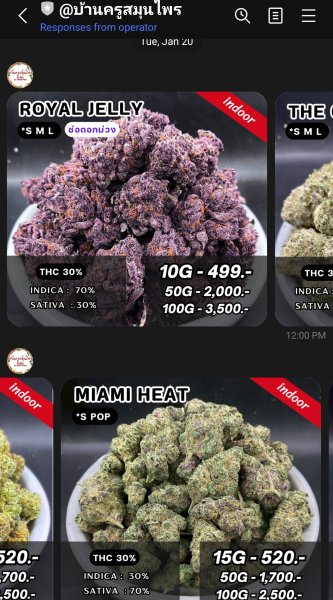
@บ้านครูสมุนไพร Has been great to deal with. Many varieties and grades at very fair prices. Shipped COD by the Thai Post. https://www.youtube.com/@THAIGrowerClub
-
Curious how one would deposit those funds if they are on a VE/TV?
-
Same for Linux.
-
Update, no issues encountered. Small amount, brass pipe, and a smoke buddy in my backpack.
-
The guy in the video says the waves were 4-5 meters.





