




LINE VOOM will permanently close in Thailand at 11am on Monday, September 28, with all content on the service due to be deleted once it shuts down.
LINE announced the decision on August 3, saying changes in the internet market had led it to consolidate resources used to manage its services. The shutdown process will begin on August 31.
All posts, messages, photographs and videos held on LINE VOOM will be removed after the closure. Users will no longer be able to access the service in Thailand.
For foreigners living in or visiting Thailand, the announcement is relevant if they use LINE VOOM to store personal photos, videos or posts, or to follow local businesses, organisations or official accounts. LINE has advised users to save anything they want to keep before the September 28 deadline.
Backup tool is available on computers
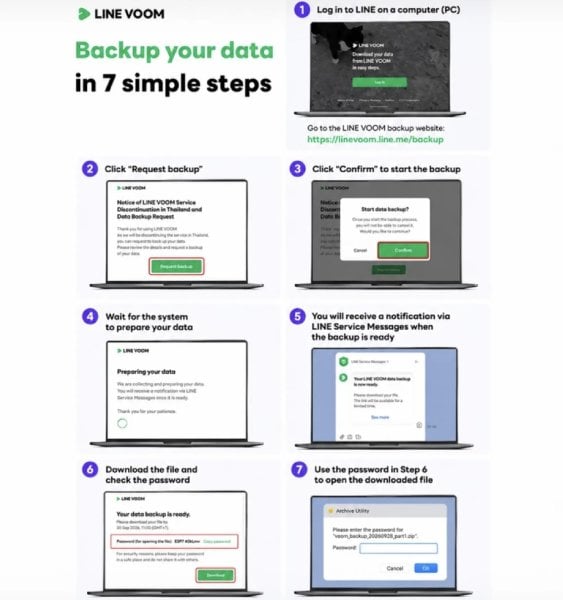
The backup function has been available since July 1, but it can only be used through a desktop or laptop computer.
Users must sign in through the LINE VOOM backup website, select "Request backup" and confirm the request. They must then confirm again to start the process.
LINE will collect and prepare the data, then send a completion notice through LINE Service Messages. Users can download the backup file and will need the supplied password to open it.
Stories and follower features will also end
Several functions linked to LINE VOOM will disappear when the service closes. These are Stories, Follow and Followers, and Birthday Cards on LINE VOOM.
Those wishing to continue receiving updates from accounts they follow have been advised to add those accounts as friends before the shutdown. This can be done by opening the My menu, selecting the settings icon, entering the Followers section, choosing an account, selecting the chat icon and adding that account as a friend.
However, LINE said this option is available only for official accounts.
LINE apologised for the inconvenience and thanked users for supporting LINE VOOM. It said users with questions, or those who believe they have been affected by the change, can use its enquiry form within 30 days of the August 3 announcement.
The company added that it would continue developing and improving its other services.
Picture courtesy of The Nation
Join the discussion? 

4 August 2026
Recommended Comments
Create an account or sign in to comment