




jeffandgop
Advanced Member
-
Joined
-
Last visited
Everything posted by jeffandgop
-
Thank you.....
-
Anyone have suggestions where to park at or near the new US Consulate at Super Highway? Thank you for your tips…….
-
Medicare Part A is free for those who qualify. Most do qualify but not everyone does, and then you have to pay for it. Suggest you do a little research to be sure you don’t have to pay. Here’s some info: https://www.healthline.com/health/medicare/is-medicare-part-a-free#part-a-costs
-
You should be able to update your banking during the interview. For depositing in a bank OUTSIDE THE U.S., they only need: Name & Address of Bank (have the tele# at hand) Bank Account Number Swift Code Type of Account As to Medicare Part A, being overseas they should ASK you if you want to enroll. If you don't want to enroll, and if the interviewer doesn't ask, then you need to inform the interviewer.
-
The interviewer didn't ask anything other than what I supplied on the application to begin benefits. You're overthinking....don't worry......
-
I assume you have applied for benefits. The call is principally to verbally verify the information you provided in your benefit application. I recall my call took about 20 minutes. And the call came in past the appointment time so I suggest you change your dental appt as you do not want to miss or re-schedule this important call....
-
My pink card and yellow book has Thai script for my name. That was how it was issued by Thai authorities. The Bangkok Bank rep did not state that was the reason my pink card was not acceptable. I will ask the bank manager the next time I go there
-
Yes my name on my bank account is in English. But I do not understand why a translation of my name on my pink card from English to Thai would be a problem, especially as it has my photo on it...have you had such an experience? Thank you.
-
I use the bank's TT exchange rate from the same date as the bank balance was that I report. Never had a problem with this.
-
Read my post from last Wed which explains...the bank seems to demand TWO pieces of documentation that matches your home address to the address the bank has for the account. It's not a firm requirement that the documents have your photo. A passport does not have your Thai or any other address (U.S. PP).
-
It has the address as I posted 5 days ago.......
-
I use Apple products and don't have that constraint...the OP didn't mention what OS or hardware he's having issues with
-
Don't have to use Google play. Just reset your region to be Thailand, go back and dl Shopee, then restore the region you had previously setup
-
Apologies to you Liquorice....you are correct, my pink card HAS the address! and the bank rep even tho I handed it to him said that it did not and I took him at his word w/o looking myself....
-
My pink card "should" have my address on it?? Well it doesn't. And never have I ever had to provide proof of an overseas address for EOS's or to have a Bangkok Bank FD account. I agree with your statement re scammers and mule accounts; that I heard from the bank as well.
-
I had a similar experience last year at my home branch in Chiang Mai. I have had a FD account for the last 5-6 years; solely for Immigration EOS purposes and never has the balance been less then the EOS requirement. I have lived at the same home address over 10 years + as well. Late last year my wife & I were in Nan for a week when I received a call from bank. She said that they needed to update their records related to my FD account and would I come in that day bringing a photo ID and the FD bank book. I said I was away and would come in the following week with my new passport and she urged me to do so as soon as possible because the account would be frozen if I did not come in soon. Five days later I was sitting at the desk of another bank representative- not the one who had called me. I had obtained a new passport the prior year and I assumed that the expired passport info in their records was the cause for their call. I asked the rep why I had been summoned to bring in my passport and he responded that I because I had made a withdrawal from my FD a few weeks back, the bank “treated” that as now placing the FD account in a “new account” status and new accounts required additional customer documentation. It had nothing to do with my expired/new passport per se. So I passed to him my current passport and he said that was not what I needed to provide the bank. He said that they needed a current form of identification that has my name and home address on it to match to their FD account records. I responded that was not what the phone call I received stated; but in ay case I had my Thai driver’s license which has my address and gave him that to copy. Then he said that they now required 2 forms of ID, not one. My “pink” Thai ID card I had with me was not acceptable as it does not have a home address. My yellow book has my name and address, but no photo; and the representative said that the yellow book WOULD be acceptable as a photo on the ID was not part of their new requirement. Having not brought that yellow book with me I told him that I would have to come back with it in the next few days. The rep then said that my FD account had been frozen (as of the date of that call I received the prior week I found out) and would remain so until I had satisfied the bank’s new requirement. Obviously at this time I am not pleased to be summoned to the bank to provide documentation that was not the requirement that the rep on the phone call stated the prior week. I was not pleased to have the bank now require another identification document proving home address for an account that was opened 6+ years before, with my present and unchanged home address of the last 10+ years; and that the bank was treating my FD account as a “new” account merely because I had made a transaction on it. The rep was seriously embarrassed by all of this as he directly told me he did not understand why the head office was requiring this under the circumstances of my FD account and history. The rep asked if I had any documents having my name and address on it, such as a utility bill. I replied that I had a cellular account with True and asked if I had a copy of a billing. I didn’t have a paper copy with me so I opened the True app on my phone and navigated to a bill that showed my name and address. He replied that would satisfy the bank and took a photo of my phone display on his phone. My FD account was unfrozen later that day. So what are my takeaways? A withdrawal from a Fix Deposit account triggers a flag in the bank’s system to verify that their are 2 pieces of documentation matching the account holders name to the address of the account holder in their system. A photo of the account holder is not an element of this name-address requirement. I also have a joint savings account with my wife. This is not required for that account. Calls from a bank representative asking an FD account holder to bring to the bank documentation can be incomplete or erroneous; so if you get a call ask the bank rep to be very specific or explain to the rep what forms of identification you presently have and which will fulfill their requirements. What documentation ultimately satisfied my bank branch’s records may not be the same as yours; that the OP’s Certificate of Residence was not acceptable yet my phone bill was, is a prime example of this.
-
There is no allowance, limitation or exclusion for determining IRS social security taxation on benefits for residing in a foreign country
-
"So if your total SS income is above the filing requirement threshold but half of your SS income is below it, are you required to file or not?" YES. Your gross income determines whether you need to file or not.
-
I have a 2020 Ford Everest. I'm looking for any Non-Dealer maintenance and repair shops in Chiang Mai to service my vehicle. If you know of any high quality and ethical shops please let me know. Thank you.
-
I have a 2020 Ford Everest. I'm looking for any Non-Dealer maintenance and repair shops in Chiang Mai to service my vehicle. If you know of any high quality and ethical shops please let me know. Thank you.
-
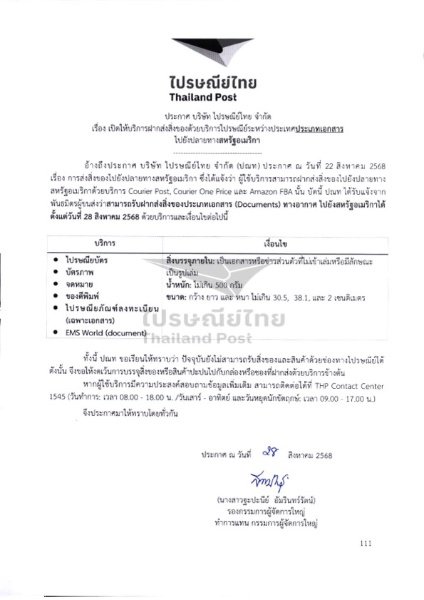
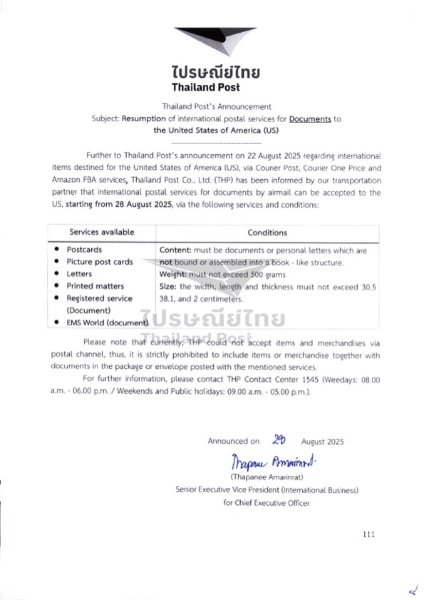
That is not an official rule/requirement. Regular non registered airmail with or without tracking is permitted. Here's the official announcement from late August. If there is a superseding or other announcement I am not aware of one.
-
If the funds are in a Bangkok Bank fixed account you are not able to obtain an ATM card for the account.
-
https://apnews.com/article/social-security-cpi-bureau-of-labor-statistics-cc44750abb0c3a5c2de45626891daa17
-
The announcement itself is in English & Thai and is posted in the topic "2025 SSA Form 7162 - "Hello, are you dead yet?" forms". Find the posts from September 1 and onwards and you will find the link to the announcement there. I have repeatedly told you this. (Trying to find where the announcement is on their FB pages is most difficult having been more than a month ago and there are so many posts everyday).
-
Thanks for your input. To clarify, I and others were not asserting that it was any Post Office who were accepting letters and correspondence to airmail to the U.S., but was an official announcement from the country’s Post Office leadership posted on the Thai Post Office’s FB page that airmail services had resumed.





