




Jan Dietz
Member
-
Joined
-
Last visited
-
What does your contract state? At least you're "entitled" to take 30 days to find a better place, won't be hard.
-
I just completed this quiz. My Score 70/100 My Time 103 seconds
-
Try Mr. DIY, they may stock some. Otherwise Lazada / Shopee for sure.
-
Fiscal year is Jan - Dec. If you transfer this year AND you have been in the country this year for < 180 days you are not a tax resident. Same for next year. Being out of the country for 180 days split over two fiscal years doesn't help.
-
Just bring them in and present them with your next purchase.
-
https://faq.whatsapp.com/209942271778103/?helpref=hc_fnav&cms_platform=android
-
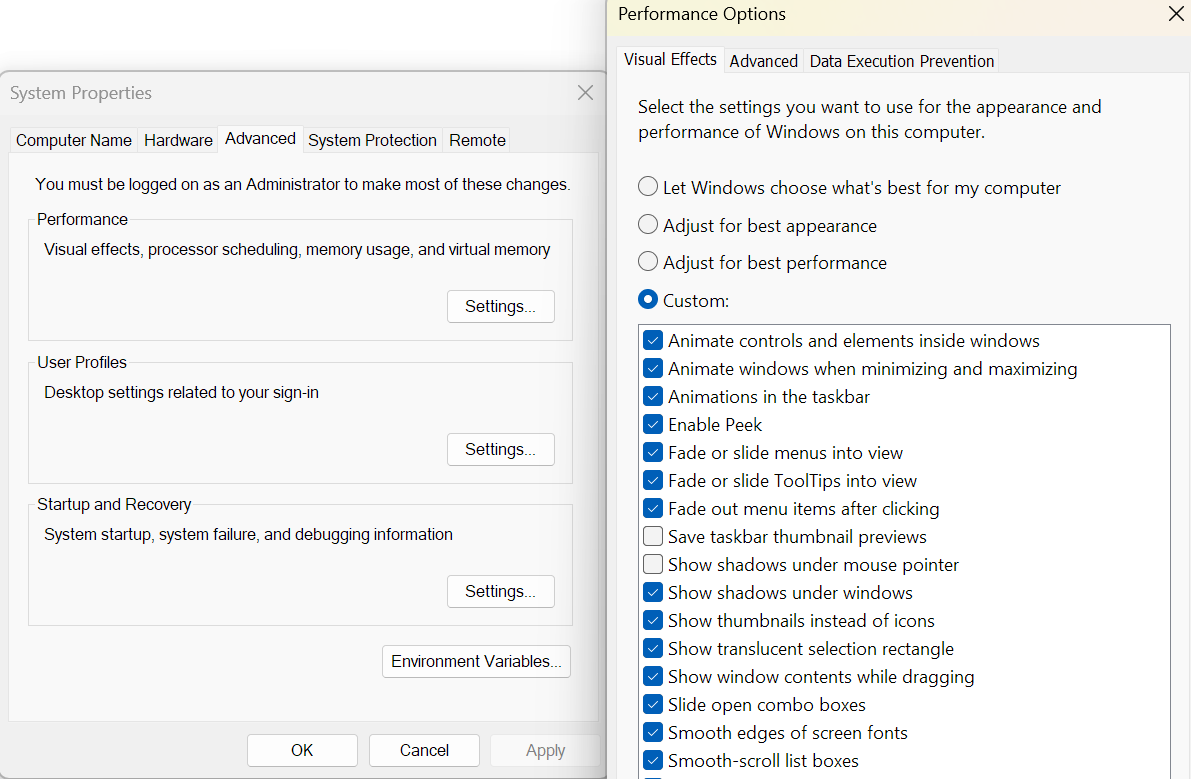
Settings - System - About - Advanced System Settings - Performance - Custom - Untick "Fade or Slide Menus into View"
-
I just completed this quiz. My Score 60/100 My Time 58 seconds
-
Try this one? https://www.thekeyboardco.com/blog/index.php/2014/12/optimus-popularis-hands-on-review/
-
I just completed this quiz. My Score 40/100 My Time 137 seconds
-
Simplest way: Buy a USB stick. 32GB should be more than plenty. Provides an easy backup as well for about nothing. SanDisk is pretty OK
-
I just completed this quiz. My Score 70/100 My Time 108 seconds
-
I just completed this quiz. My Score 60/100 My Time 25 seconds
-
Does it have a reasonably standard power supply (desktop computer type)? If so, start by replacing that.




