




Totoandlilly
-
Joined
-
Last visited
Posts posted by Totoandlilly
-
-
-
53 minutes ago, HeyHeyHey said:
Pathetic
A country with GDP per capita $6600 while most of the government are billionaires and the who you shall not speak about one of the richest persons on the planet
It’s more correct to use GDP per capita PPP which is almost 17.000$
-
 1
1
-
-
-
44 minutes ago, Tyrant said:
With all the arabs now in EU, a little more and Europeans will be banned from the rest of the world.
True. We must end the EU dictatorship
-
1
-
-
It’s safe to let kiwis,aussies,yanks and moose in, but please don’t let any country from schengen/EU us the automatic gate, to many terrorist and criminals there, Europe have become lawless continent , when I’m leave EU they should be allowed to use it though.
-
 1
1
-
-
- Popular Post
33 minutes ago, ChipButty said:How he's going to save the world and convince the world Thailand is the center of the universe
I guess your home country is the center of the universe ????
-
 4
4
-
3
-
- Popular Post
48 minutes ago, spidermike007 said:Not just getting your money back from a car dealer. Getting your money back from nearly any Thai person is tantamount to a miracle!
Unless it is family, trusted friends, and the like. Have you tried getting a refund on a product? Or getting your deposit back on your house or apartment? Sure, there are honorable people here. But, for some reason, there are alot that have an easy time taking your money, and a very, very hard time giving it back!
The people that I have been having a hard time with to get my money back from have been other foreigners in Thailand, so far never had any issues yet with Thais.
-
2
-
2
-
4 hours ago, cmsally said:
Isn't there a choice of GRAB and GRAB ROT DAENG on the app?
So some red truck drivers do go through GRAB I presume.
The songtaews are licensed as they all have yellow plates. It seems that GRAB cars are not licensed to take passengers and therefore paying passengers would not be covered under their insurance if they got into an accident.
If you are in a accident with grab the insurance cover the passenger, when my gf applied to be a grab driver she had to prove she had a drivers and the car is insured, the whole process with the training, documentation etc took well over 2 weeks, grabcars have to be in a decent standard, and of the money the driver make 25% goes to the grab company.
grab is legal all over asean and it seems to be that people prefer grab because of convenience and safety.
Let people choose what they want to use.
-
-
22 minutes ago, from the home of CC said:
pushing the consumption of the worst drug in the world is not what Thailand needs, they need less not more alcohol addled pinheads running around the streets..
Let people choose how they want to live, and you choose your way to live, that nanny state thinking should be left back in the nannystate.
-
2
-
-
- Popular Post
2 hours ago, toofarnorth said:Who really needs to drink between 2 am and 4 am ? Midnight and one for the road is ok if the road is walked but even in the '60s when I was a teen I needed home after midnight ,is there anyone on TV who would like a beer at 4am ?
Tourists come for partying.
bars should be allowed to open and close when they want, if people don’t like the noise, the country side is nice and quiet after 8pm
-
4
-
1
-
 1
1
-
Thailand is literally the nannystate of Asia, Thailand is so anti-smoking. Go to Malaysia,Indonesia and Vietnam and you can smoke everywhere, they even have cigarette advertising.
But please respect those that don’t smoke, you really don’t smoke in the middle of a crowd or at a bus stop etc.
-
1
-
-
- Popular Post
Germany lost ww1 and ww2 now they are training to gain power with EU, to hell with Brussels.
-
5
-
3
-
1
-
2
-
- Popular Post
EU is anti-democratic, please admit it, there is no such this as democracy there, but only tyranny!!
-
9
-
5
-
- Popular Post
Soviet Union 2.0 doesn’t like UK become democratic again, looking forward to the anti-democratic Union collapse.
soviet collapsed 1991
EU 2021 ?
-
12
-
5
-
2
-
1
-
1 hour ago, darksidedog said:
I flew out of Suvarnabhumi late last week and the queues for people departing were just shocking. After a crafty last minute ciggy, I went to immigration at 10 am for an 11.40 flight. Got to the gate at 11.25. Flight was delayed for half an hour as many were still stuck in the queues, and they weren't using the fingerprint scanners, which would have taken more time. Of 10 possible desks, six were open. I am really not looking forward to my flight back again in a couple of weeks. When I arrived at Heathrow I was through in less than a minute. All desks open and very efficient. You really can't put the problems at swampy down to anything other than pure incompetence.
Everytime I arrive Norway from Thailand at Oslo airport there are long queues there same as Suvarnabhumi...
-
-
1
-
-
-
- Popular Post
1 hour ago, Quickmill said:The process to first discussion with EU about FTA has began last month, we will see the result.
The EU will collapse one day, communism don’t last long, the Soviet Union collapsed in the 90s.
when you take democracy and freedom away from people they get fed up.
-
3
-
1
-
- Popular Post
There is no limit on how many tourist visas you can get.
i’m waiting for some people now to say “ get the visa that fit your purpose of stay”
if you are not married, not over 50 or don’t have any Thai children , it’s not easy, unfortunately, let’s hope one day there will be new visas that will make younger westerners stay in Thailand easier.
-
3
-
1
-
5 minutes ago, TallGuyJohninBKK said:
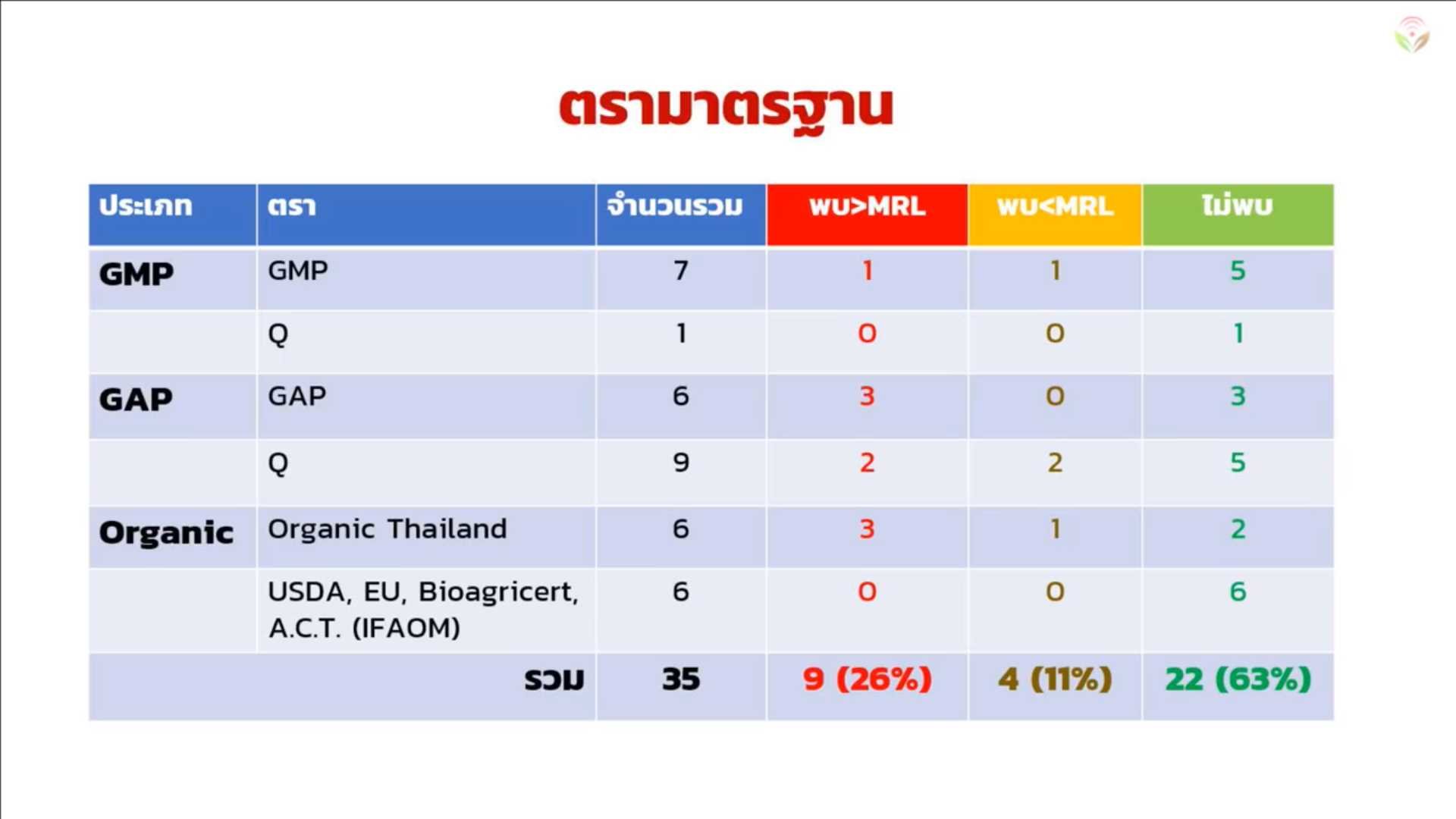
Here's the results of this year's Thai-PAN testing of organic fruits and veggies sold here. The red means they had levels exceeding those allowed, orange means detectable levels within limits and green means clean.
As you can see above, in their limited sample, HALF of the "Organic Thailand" products had red levels of pesticides, as did HALF of the Thai GAP certified products. But by comparison, all of the internationally certified products tested came back entirely clean.
Reference to that they come clean
-
20 minutes ago, TallGuyJohninBKK said:
That's the problem... The various Thai-based "organic" certifications have been shown to be pretty much meaningless and false. All too often, products here that claim to be organic are in fact not.
It's kind of pointless to develop better channels for marketing and promoting "organic" food products that aren't really organic... And I'd dare say, a lot of the folks here who actually care about eating organic foods are all too keenly aware that the Thai government certifications are meaningless.
Wait till they start trying to export Thai-certified "organic" products to developed western countries, and the inspections and testing there start setting off danger alarm bells.
Time to get off the barstool and visit some organic farms, plenty of them in Chiang Mai.
-
1
-
-
-

Public backs activist Sombat after US rejects entry visa
in Thailand News - Discussion
You don’t need a visa to enter the USA, they have a southern border that is wide open.