





Daffy D
Advanced Member
-
Joined
-
Last visited
-
Right click on the Task Bar at the bottom of the screen, then click on "Task Manager" to show just about every thing that's running Right click on anything that's suspicious to give menu of options. 😀
-
There does not seem to an obvious way to check usage and balance, if there is one we have not found it. Every day I just check we're still connected and not worry about it till one day we're not then figure out what to do. GOMO sim cards for 99฿. since June last year, I ain't complaining
-
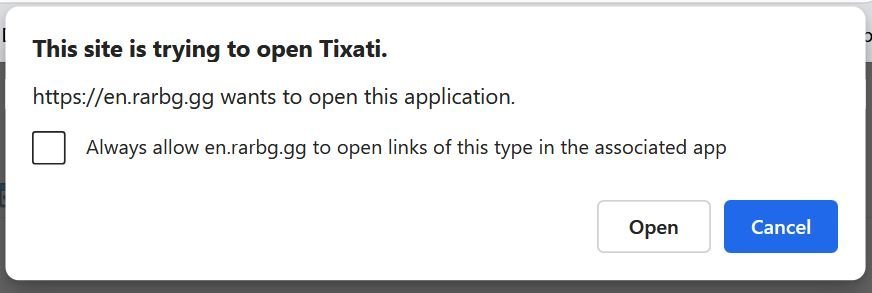
I did try Tixati but didn't like it so uninstalled it using IObit Uninstaller and then cleaned out any bits left with Search everything so there should not be any bits of Tixati left . My default Client is uTorrent and still works of with a couple of the private sites I mentioned in my original post. Does no one else have this annoying pop up problem? Your link does not seem to work 😞For the last few days have been getting "This site is trying to open Tixati" pop up when trying to download Torrents. If I click cancel the page disappears and am unable to download anything. Is anyone else having this annoying pop up? I have been happily using uTorrent for many years without problems and don't want to change, especially when forced to by some unwanted annoying pop up. This pop up happens on public sites, not private like Chaos and TD, so limits the choice of available downloads. Happens on Edge and Chrome but Firefox gave a choice of not using it. Anyway I want to get rid if it just don't know how. Help! Thanks
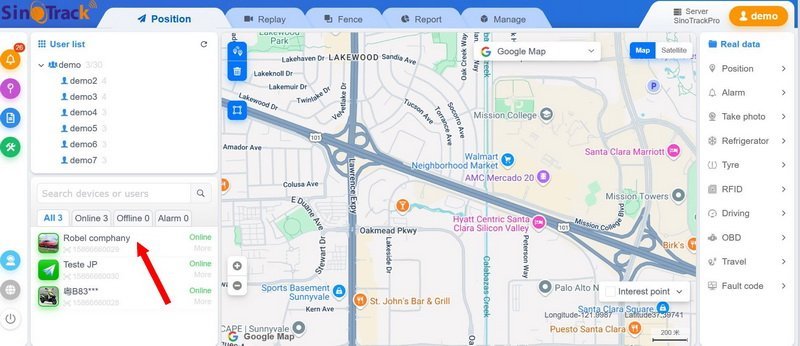
 Not any more. Trump doesn't realize it yet (will he ever?) but he has promoted Putin to that spot. He will also go down in history as being the first American President to abandon his European allies. A sad era for the USASmall Plank of wood to spread the jack load on soft ground, and couple of blocks of wood to give extra jack height.It's definitely the phone number I was referring to, the tracker ID number is something else. By right clicking on the location of the bike on the map it brings up a list of things going on and the two numbers are obviously different. Anyways no worries for now, been nearly two months and the COMO sim is still working so will leave well alone for now. 🙂I did read on one forum that battery drain was a problem with this tracker. Don't know if all trackers are the same, but anything permanently connected to the battery would have the same effect. Guess it's not such a problem for a car. My bike is used practically every day and only stands sometimes a couple of days at weekend so never had this problem. Seems like you got the tracker working,OK ! so had a chat with the wife and seems she just pushed a couple of buttons, and it worked, that's all she remembers Sorry not much help for you. As far as I recall the tracer doesn't do text, you call it and have to enter a code number for the various functions. I didn't bother with all that just got the "Engine On" - "Speed" and "Mileage" to show. If you really get stuck you could try SinoTrack help [email protected] or chat to one of those pretty girls at one of the many phone shops perhaps one of those could sort out the problem for you, http://[email protected] - https://manuals.plus/th/sinotrack/st-901-gps-tracker-manual Good luckSorry to hear you're having problems. Have to confess I only did the hardwire installation on my tracker, left the all the SIM stuff to the wife. I don't have a phone so all this "new" technology is gives me a headache so leave it all to her. The wife is out at the moment but will try get some answers for you and post again in tomorrow. We did not buy any additional package, just used the GOMO sim straight out of the box. Though there is the strange case that the tracker is still on the original phone number of the original SIM.! When you first open the SinoTrack app it brings up a map. of what I presume is the SinoTrack home base. To start activating your tracker you have to click on it's ID in the window on the bottom left. Hope this is some help, will post again tomorrow after having spoken with the wife.
 Malware risk is always a concern with any file, just wonder why PDF, which is one of the most widely used formats should not be allowed. Quite a few other formats are allowed, which I'm sure are also susceptible to malware, just curious why PDF would be more so? Seem to remember plenty of PDF files for download on the Immigration download forms page, so they can't be all bad. As for using the "cloud" thing, I just can't be bothered. I'm too old and cranky now to sign up to any more things, they always want more and more personal information. The only reason I'm asking about PDF is that a couple of time when I tried to answer a post on here with a PDF attachment I couldn't. Only trying to be helpful.Yea! tried that, Still leaves the blank windowYes, I know what files ARE attachable, just wonder why PDF are not. What's wrong with PDF files? It's a very common widely used formatCan't see a "clear editor" option.




