



.jpg.5042d9ebe809318b12a02a9d9758888b.jpg)
.jpg.5979023a614245bb6f9c07f686496aba.jpg)
MartinL
Advanced Member
-
Joined
-
Last visited
-
Currently
Viewing Topic: Roojai Customer Services Poor Response
-
Does anybody have a contact for a Customer Services Manager at Roojai insurance? Not the 'first contact' customer services but a step up from there. Three weeks ago I renewed my car insurance with Roojai for the 6th. time. For every one of those renewals, until now, I've had maximum 50% No Claims Bonus. This time, NCB was REDUCED to 40% with no claims or changes in circumstances. I immediately contacted Roojai customer services and asked why. Their response was that they'd urgently contact the underwriting dept. for an answer. No answer so far despite a reminder - so not very 'urgently' - and I want to take it further. TBH, despite their claims to have 'Award-winning customer services', I've always found them pretty useless for anything other than routine, mundane questions. This hasn't improved my opinion.
-
Moved to another forum.
-
Please don't think that I'm any kind of authority on these things!!! Far from it - I just muddle my way through like most people and eventually seem to arrive at something that works for me. I use my average FX rate (BkkBk BTW) because I calculate and record it in a spreadsheet for every transaction so it's readily available all the time. It also relates directly to remittances. Average FX rate = ฿ rec'd in account for the year/£ sent from UK over the year. Digging out historical BoT rates could be a small PITA, I think, but fine if you have nothing else.
-
Just reread my last post and it mightn't be entirely clear. " ... amount of income rec'd from abroad (THB) > amount of tax payable abroad (THB) > amount of income brought to Thailand (THB)". That should be GROSS UK pension income, tax on gross income, amount remitted to Thailand. Say gross UK pension is 20,000, tax on that is 1,500, remittance is 15,000 = 75% of gross >>> 75% of UK tax is 1,125. If that is more than calculated Thai tax on remittance >> no Thai tax to pay. To calculate figures in THB I used the average FX rate I received for remittances during 2025, which was 42.68฿/£. Enjoy the beer(s).
-
Log in > Check "Income .... Thailand and abroad" > status (married, single, divorced etc. - only in Thai so you might need help here) > Taxes and income spouses (may not get this if unmarried under 'status') > 'Next' button > Income from salary > salary according to 40(1) > specify info. > source of income country (difficult o find United Kingdom (DTA) but it's about 3/4 of the way down the list of countries) > amount of income rec'd from abroad (THB) > amount of tax payable abroad (THB) > amount of income brought to Thailand (THB). That should do it. It'll determine whether or not your UK tax paid is enough to cancel out Thai tax. No documents requested during MY submission. Good luck.
-
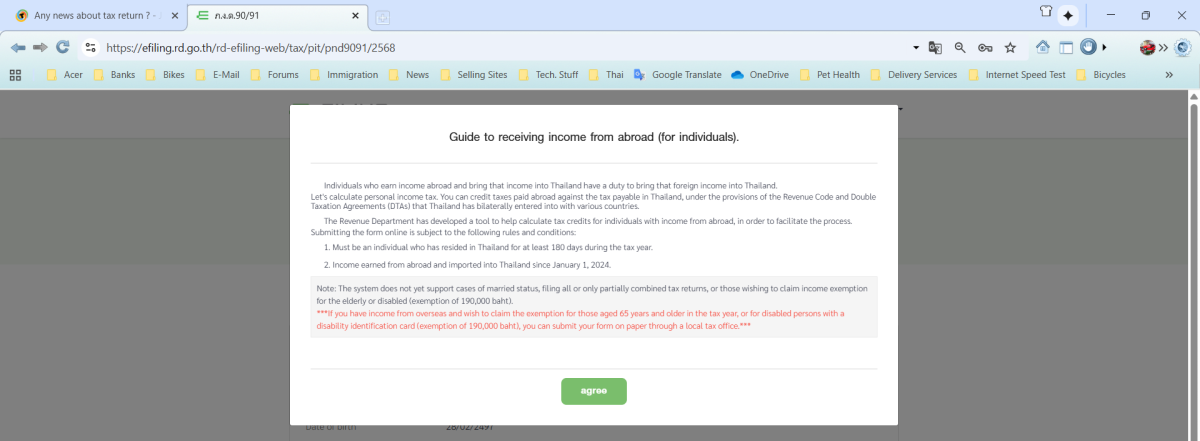
How strange! Where you have 190,000.00, I have 0.00 even though the TRD knows I'm 72. I log-in, click on button for "Tax return form (Form PND) 90/91", just below address I select "Source of funds ....... Thailand & abroad" then the message comes up. Here's a screenshot of it - It definitely seems to be the "Source .......... In Thailand and abroad" that brings it up. What did you enter there? EDIT - I suppose I should add that my remittances were greater than my TEDAs so would have been subject to some tax which I wanted to avoid paying (of course) - tax credits achieved that. Different experiences here and worthy of discussion.
-
Maybe there are different systems?? I use this one >> https://efiling.rd.go.th/rd-cms/ and it definitely said - in a big pop-up window - that the 65+ allowance cannot be claimed via that route.
-
I was concerned - note; NOT worried - about tax credit proof in my post just above this. I decided to dive in anyway so I've just completed and submitted my online tax papers for 2568 - Form 91. As far as tax credits for UK tax paid are concerned, it couldn't be simpler. The form asks for country from which remittances originate - UK for me. Alongside UK it says "(DTA)". It asks for gross income in UK, income tax deducted in UK and amount of remittance to Thailand - all in THB. The remittance is then calculated as % of gross income and applies that %age to the UK tax paid. It also calculates the Thai tax due and compares the two. If UK tax exceeds Thai tax, it immediately tells you no additional Thai tax is due. No supporting documents requested. My UK tax was greater than calculated Thai tax so nothing extra to pay. Just one potential fly in the ointment - the 190k฿ over-65 allowance CANNOT be claimed online. In my case, that didn't affect the outcome. My tax details show I'm over that age. Job done. So easy! Now I'm abiding by Thailand's revenue law at no cost at all to me. Just ease of mind. Hope this helps somebody.
-
Thanks OJAS. Yes, I anticipated the mismatch and would - if needed - have HMRC papers ready covering two UK tax years - say Jan-Apr 24/25 and May-Dec 25/26 although this would still mean P60s for most of 25/26 wouldn't yet be available by the end of the Thai tax filing window. Whether the HMRC papers I mentioned would be enough to satisfy TRD I (obviously) don't know - and maybe TRD don't know either.
-
Has anybody here managed to get tax credits from TRD against any possible Thai tax, for UK income tax paid? If going down that route, I have P60s, an HMRC summary of taxable income and month-by-month HMRC income/tax paid summaries for each of my incomes. Sufficient?
-
Just renewed car and bike licences this morning at our local DLT office in Phon, KK province. Gave old licences plus 2 copies each of yellow book, passport inc. current extension of stay, doctor's certificate and DLT eLearning QR codes. Completed in 40 minutes. They still had video sessions for those without the QRs - which seemed to be most of the applicants this morning - but I didn't need to watch. Altogether, a very efficient process. Scanned to pay - although that wasn't made obvious until I specifically asked about it. Paid for bike and car licences separately. When I renewed 5 years ago, I was told that, if they put Yellow Book/Pink Card ID number on the licence, it would only be valid in the local vicinity. This time, I gave YB/PC number AND passport number. They chose to use the YB/PC number and told me it was now valid for use countrywide - a sensible move.
-
^^^^^^^^^^^^^^^^^^^^^^^^^^^^ Thanks for that but there's no option to 'update' alongside the State Pension figure although there is, as you say, alongside the private pensions listing. If it was that easy, we'd have found and used it long ago instead of going through the performance described in this thread every year.
-
Didn't work. My Tax Code has changed again for 26/27 entirely on the assumption of a CoL increase on a frozen state pension. Today, I've fired off a complaint about the response to my earlier complaint. Must be nuts for expecting competence from Civil Servants!
-
I posted the topic below many years ago. Not exactly your situation but I'm certain that male cats are perfectly capable of killing kittens.
-
Until last year, I used to put up a Christmas tree with decs. and lights, at Mrs.L's request. This year, our elderly and unwell cat's decided that small table's her favourite place to sleep during the day so I've now got an excuse not to do it. Also, 25th. December is the day to go to KK Immigration to get the renewal stamp for my marriage extension after the 'under consideration' period. I've never been a fan of Christmas so all that suits me just fine. But we'll go to see my wife's brother for lunch after Immigration - that's usually a fun time.
.thumb.jpg.a649cacedeeccbc218adc073bf668ef2.jpg)



