

george
Advanced Member
-
Joined
-
Last visited
Everything posted by george
-
I notice that Hua Hin is not mentioned as usual.
-
Tonight’s maintenance is done. I need your feedback please! Any improvement in page load speed etc? is the forum loading faster now? We will continue doing nightly adjustments as I still think some page load could be improved! Feel free to post feedback! 🙏
-
As soon we have a new version installed and we are happy with the performance, we will activate the third-party vendors plugins within a few days (including arrow up to top, delete old notifications etc.)
-
Okey, the supplier will fix tonight!
-
This forum will be upgraded with a scheduled software patch tonight 00:05am, and the site may be down for short periods within a window between midnight and 03:00am. Some users have reported issues when clicking on links or are experiencing long loading times of pages while posting. During this scheduled maintenance the software vendor will fix the issues. We apologize for any convenience. 🙏🏼 /Admin
-
Can you please post example of links that takes time to load?
-
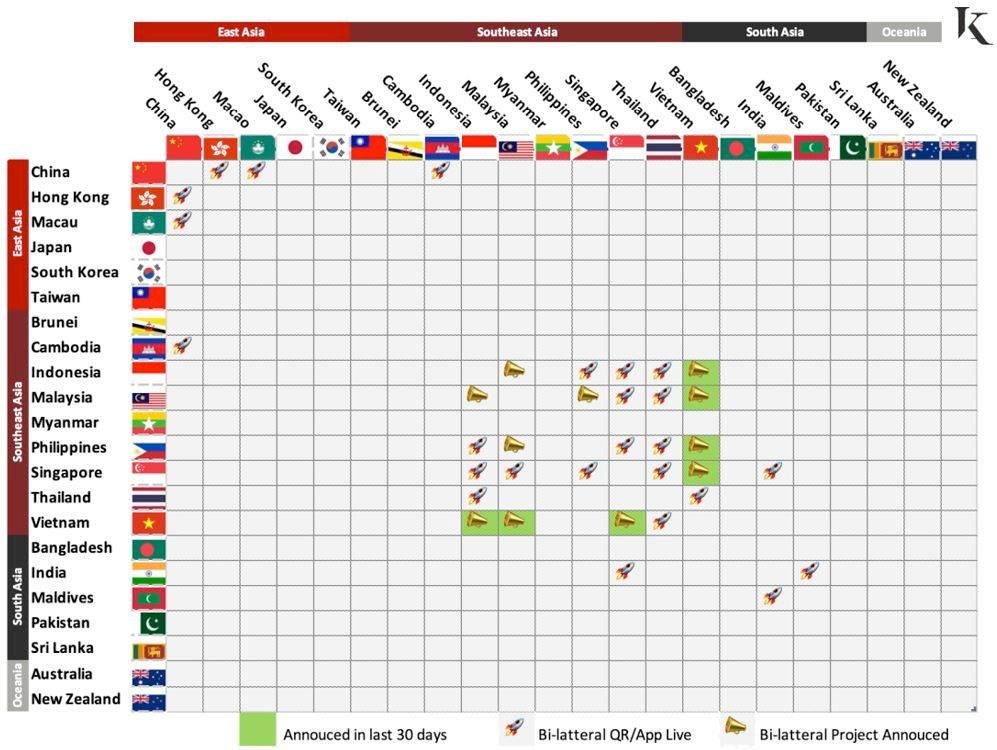
Southeast Asia Regulators to link PromptPay-like networks across the region:
-
Love is in the Air for sure ❤️
-
20238D1A-0F54-454B-8FD9-88F68F1425BF.mov
-
We have got a software update this morning, so ASEAN NOW should be fast loading now. Let us know if yiu still have slow loading pages. Thanks!🙏
-
The datacenter we were hosting at had issues so we have changed datacenter. The vendor is upgrading our templates this morning, so all looks good. There is no power struggle going on, please don't post crap like this. I'm closing this thread as its defamatory.
-
We was NOT hacked, but we changed datacenter because we wanted a higher grade of hosting. During this weekend we are fine tuning everything. Sorry for the inconvenience!
-
These are so called plugins, from external developers. It's not part of the core software package. As we have changed to latest version of forum software, we are waiting for these developers to release a version that we can use. Next week is my best guess 🙏🏼
-
update finalized.
-
The forum will be down for maintenance from now and for a few hours, We will optimize our servers and speed up page load, which we are aware is slow right now. Sorry for the inconvenience! We hope to serve you much faster from midnight, or earlier we hope. Admin 🙏🏼
-
Please try again now, we have upped the upload limit for pics and attachments. Thanks!
-
Please test upload again, the file size limit has now been increased. 🙏🏼
-
I will ask sysadmin to allow bigger file sizes. Thanks! 🙏
-
We are aware of speed issues and the tech people are monitoring andfine tuning the system for us.
-
Could you try to upload a smaller file, maybe half size or so? We have recently changed server, so maybe needs an adjustment.
-
Hi, could you please try to upload same photos in this thread so we can tech investigate. How large size are the photos in MB?Here is our announcement: https://aseannow.com/topic/1312306-forum-back-online-after-cyber-attack/Good, now they can really beat True and other substandard ISP's.Unable to comment on security.