ravip
Advanced Member
-
Joined
-
Last visited
Everything posted by ravip
-
Thank you very much. Got one from Vodafone the next day. 🙏
-
Absolutely disappointed. Great. A couple of dollars would not break the camels back. Shall take the most convenient.Jennifer, a manager at a local Lidl store, had the task of hiring someone to fill a job opening. After sorting through a stack of resumes she found four people who were equally qualified. Jennifer decided to call the four in and ask them only one question. Their answer would determine which of them would get the job.* The day came and as the four sat around the conference room table, Jennifer asked, 'What is the fastest thing you know of?' The first man replied, 'A THOUGHT.' It just pops into your head. There's no warning. 'That's very good!' replied Jennifer. 'And, now you sir?', she asked the second man. 'Hmmm...let me see 'A blink! It comes and goes and you don't know that it ever happened. A BLINK is the fastest thing I know of.' 'Excellent!' said Jennifer. 'The blink of an eye, that's a very popular cliché for speed.' She then turned to the third man, who was contemplating his reply. 'Well, out at my dad's property, you step out of the house and on the wall there's a light switch. When you flip that switch, way out across the pasture the light on the barn comes on in less than an instant. 'Yep, TURNING ON A LIGHT is the fastest thing I can think of'. Jennifer was very impressed with the third answer and thought she had found her man. 'It 's hard to beat the speed of light,' she said. Turning to Wally, the fourth and final man, Jennifer posed the same question. Old Wally replied, 'After hearing the previous three answers, it's obvious to me that the fastest thing known is DIARRHOEA.' 'WHAT !?' said Jennifer, stunned by the response. 'Oh sure', said Wally. 'You see, the other day I wasn't feeling so good, and I ran for the bathroom, but before I could THINK, BLINK, or TURN ON THE LIGHT, I had already sh## myself...' Wally is now working at a Lidl near you!You can also download and install LibreOffice - a free alternative to MS Office.Did you ever leave Thailand at all? Anyway, lovely excuse to 'save face' . OK. We believe you!From where can "we" find people to carry out this "Independent" Investigation?Already covered 7 pages... BS seems popular!Maybe smoked?What are these ?
 Which brand?You should have said it like this...
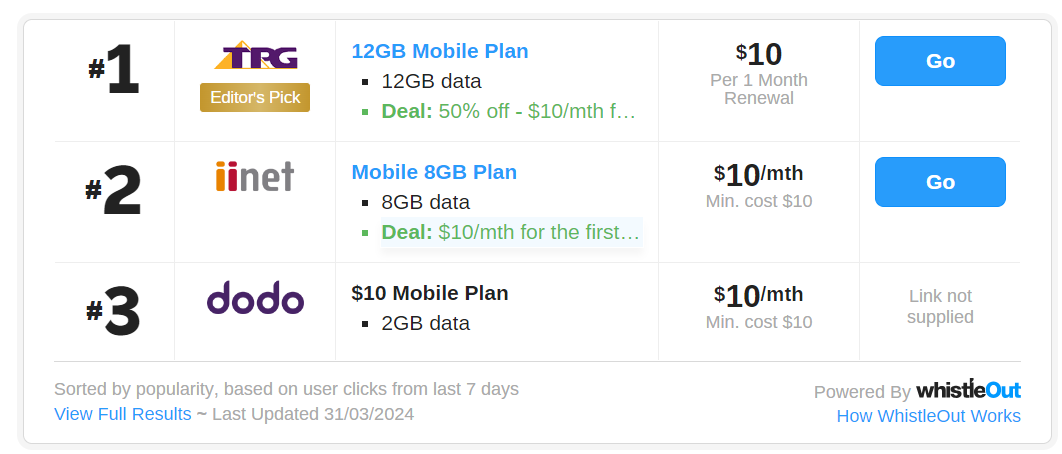
 Whatever said and done, now the Chinese & Indians are losing their place - the International community are giving them tough competition! Just proves, these morons are amongst us where ever we go - no escape at all!I will be visiting Australia next week, for 1 month. Can someone recommend a SIM for a tourist? Data 6Gb would be fine, and some local calls. I will mostly be around Melbourne. Thank you in advance.
Account
Navigation
Search
Configure browser push notifications
Chrome (Android)
- Tap the lock icon next to the address bar.
- Tap Permissions → Notifications.
- Adjust your preference.
Chrome (Desktop)
- Click the padlock icon in the address bar.
- Select Site settings.
- Find Notifications and adjust your preference.
Safari (iOS 16.4+)
- Ensure the site is installed via Add to Home Screen.
- Open Settings App → Notifications.
- Find your app name and adjust your preference.
Safari (macOS)
- Go to Safari → Preferences.
- Click the Websites tab.
- Select Notifications in the sidebar.
- Find this website and adjust your preference.
Edge (Android)
- Tap the lock icon next to the address bar.
- Tap Permissions.
- Find Notifications and adjust your preference.
Edge (Desktop)
- Click the padlock icon in the address bar.
- Click Permissions for this site.
- Find Notifications and adjust your preference.
Firefox (Android)
- Go to Settings → Site permissions.
- Tap Notifications.
- Find this site in the list and adjust your preference.
Firefox (Desktop)
- Open Firefox Settings.
- Search for Notifications.
- Find this site in the list and adjust your preference.