ravip
Advanced Member
-
Joined
-
Last visited
Everything posted by ravip
-
Anything wrong about that? Shouldn't it be so? Sorry, I missed the point you intended to present.
-
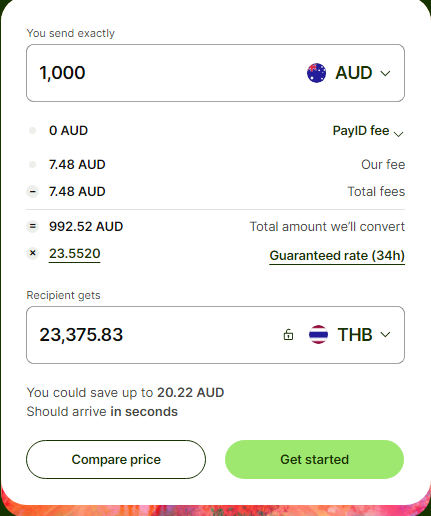
Is it OK in other countries to pick up property that is not yours? Really?Ooooh dear. Another quality tourist - other than the 'popular' Chinese/Indian/etcSmall clarification please, re WISE. I top-up the WISE account with a bank transfer/debit card etc.? Any possibility to do so with cash? For example if I am sending AUD 1000 to my Bangkok Bank account, the Recipient gets THB is correct?
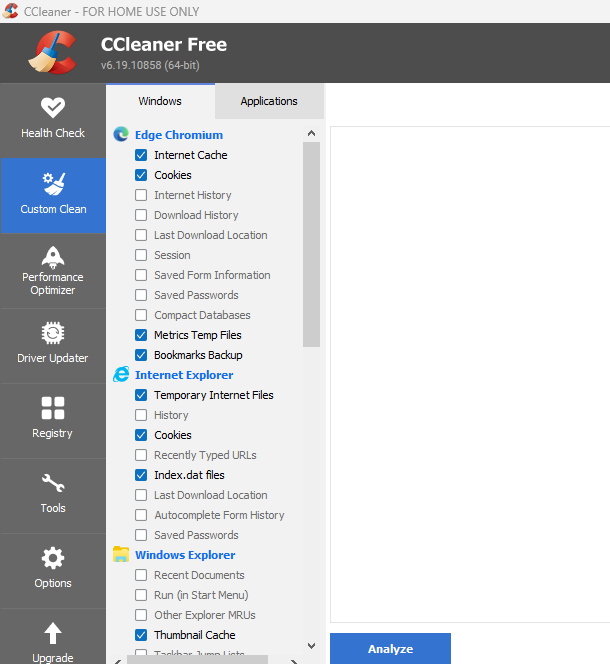
 Yes, it has happened to me too. For some reason or other, the customized selections are lost.Before running the CCleaner 'clean' function, carefully select the options you need. Check out both tabs - Windows & Applications.
 One could ask her Danish husband if private classes can be arranged... home visits?Another one of those top quality tourists! (not the 'normal' Chinese or Indian)Do a Google search : hard drive data recovery in Bangkok This lists a couple of places in Bangkok. https://www.crecover.com/en/data-recovery-rate/My best wishes to all ASEANNOW Members, Moderators, Staff & their family members
 Thank you very much. Yes, this solved my issue. (sorry for my delayed response as I was out the whole day)No, not for regular/repeated transfer. Anything between AUD 1k to 5k or so. Not big amounts.
Account
Navigation
Search
Configure browser push notifications
Chrome (Android)
- Tap the lock icon next to the address bar.
- Tap Permissions → Notifications.
- Adjust your preference.
Chrome (Desktop)
- Click the padlock icon in the address bar.
- Select Site settings.
- Find Notifications and adjust your preference.
Safari (iOS 16.4+)
- Ensure the site is installed via Add to Home Screen.
- Open Settings App → Notifications.
- Find your app name and adjust your preference.
Safari (macOS)
- Go to Safari → Preferences.
- Click the Websites tab.
- Select Notifications in the sidebar.
- Find this website and adjust your preference.
Edge (Android)
- Tap the lock icon next to the address bar.
- Tap Permissions.
- Find Notifications and adjust your preference.
Edge (Desktop)
- Click the padlock icon in the address bar.
- Click Permissions for this site.
- Find Notifications and adjust your preference.
Firefox (Android)
- Go to Settings → Site permissions.
- Tap Notifications.
- Find this site in the list and adjust your preference.
Firefox (Desktop)
- Open Firefox Settings.
- Search for Notifications.
- Find this site in the list and adjust your preference.