




Crossy
Global Moderator
-
Joined
-
Last visited
Everything posted by Crossy
-
He could nominate the gardener to wear the monitor!
-
Like the angle-grinder and paint, heat-shrink can hide a multitude of evils
-
Meanwhile, everyone is scared of AI !!! It's the ants! The ants are coming! It's Them!! Run for the hills!!

-
Of course, it will be served under "house arrest" and it's much easier to pardon a 12 month sentence
-
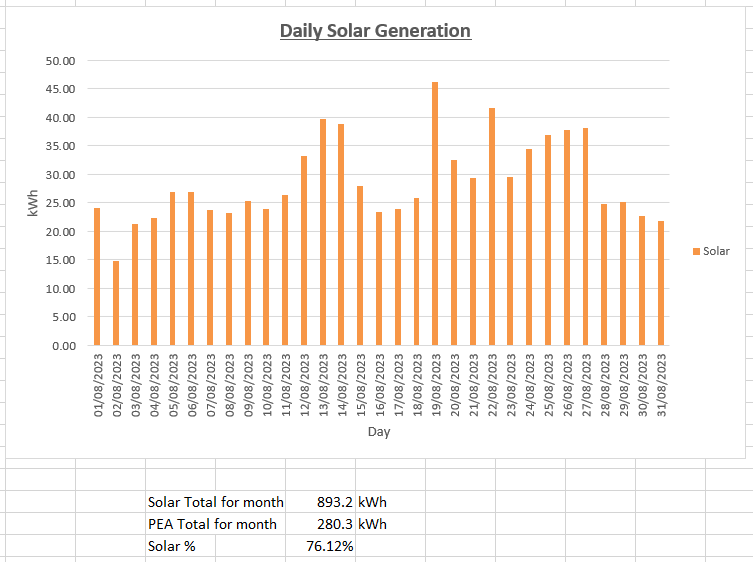
The August numbers. We were on no-export until the meter reader came early on the 19th, at which point I thought "stuff PEA" and turned export back on. By the 27th we were perilously close to going net-export (grandkids didn't come last weekend so consumption was, er, "slightly down", on normal) so I turned no-export back on. If nothing else the graph shows just how much energy we are throwing away when not exporting. Need to save my pennies for more storage.
-
I just extend the BMS wires, but a JST extension is also viable. How's your soldering?
-
Just like your PC, turn off and back on, all is OK ????
-
Our OP says "20A" (post above mine you quoted) which I'm assuming to be 20mA.
-
Try setting the beast to 30mA, that's the standard for non-adjustable units. Bypassing the RCD won't, in itself, cause damage to your kit, the RCD is far too slow to stop a lightning surge. You really need to add some surge suppression, it will have to go in a separate box.Ah ok, it's one of those adjustable beasts. Does it have "bypass" or "off" setting, what is it set to at present? Image really is too low res to be very helpful ????You may want to add surge arrestors on your incoming supply if you don't already have them. May not improve your RCD issue but may save your technology. What manufacturer is the current unit? Swapping for a big-name unit may improve matters.Is it definitely tripping on lightning surges, or has the damp got into an outside outlet/light/other? Some RCDs are more sensitive than others to power supply issues causing tripping, you could try replacing the beast with a different brand. Do check all your grounding. Do you have a MEN (Neutral - Earth) connection? Adding one may improve matters (it MUST be upstream of the RCD). Some photos of your installation with the covers off would be very helpful.I think his name is Witthaya Ketkaew Seriously, we are not permitted to edit quoted text from the source publications, even to correct typos. So, the multiple references from the linked article have to remain.+1 on Toshino ^^^, we also have some Wonpro ones that have lasted well. I try to avoid needing them or make my own. The plugs, cable and traily outlets are readily available, and you know exactly what's inside.I wouldn't risk it!! The outlets themselves will likely be ok. BUT The electronics for the USB outlets will probably let out the magic-smoke with a small bang (but not a lot else), more worrying would be the surge arrestor which stands a good chance of actually catching fire! READ THIS https://www.electrical-forensics.com/SurgeSuppressors/SurgeSuppressors.htmlDon't do that, yet. Solar does have its own vocabulary, but it's really not rocket-science. Do you have any basic knowledge of electricity, volts, amps, ohms? Got a multimeter?My first thought was over-voltage on the PV, but that looks not to be the case. As above, does the fault-log show anything useful?










Account
Navigation
Search
Configure browser push notifications
Chrome (Android)
- Tap the lock icon next to the address bar.
- Tap Permissions → Notifications.
- Adjust your preference.
Chrome (Desktop)
- Click the padlock icon in the address bar.
- Select Site settings.
- Find Notifications and adjust your preference.
Safari (iOS 16.4+)
- Ensure the site is installed via Add to Home Screen.
- Open Settings App → Notifications.
- Find your app name and adjust your preference.
Safari (macOS)
- Go to Safari → Preferences.
- Click the Websites tab.
- Select Notifications in the sidebar.
- Find this website and adjust your preference.
Edge (Android)
- Tap the lock icon next to the address bar.
- Tap Permissions.
- Find Notifications and adjust your preference.
Edge (Desktop)
- Click the padlock icon in the address bar.
- Click Permissions for this site.
- Find Notifications and adjust your preference.
Firefox (Android)
- Go to Settings → Site permissions.
- Tap Notifications.
- Find this site in the list and adjust your preference.
Firefox (Desktop)
- Open Firefox Settings.
- Search for Notifications.
- Find this site in the list and adjust your preference.