




Mutt Daeng
Advanced Member
-
Joined
-
Last visited
Everything posted by Mutt Daeng
-
Dr.Feelgood 【She Does It Right】
-
Chris Rea - Fool If You Think Its Over (Official Music Video)
-
Chris Rea - Road to Hell (Ultimate live version - 2006) [HD]
-
Disturbed - The Sound of Silence feat. Myles Kennedy [Live in Houston]
-
Looks great to me, Be even better with a piece of black pud and a piece of white pud.
-
Threatening
-
I think this is worse than any bad dress sense.
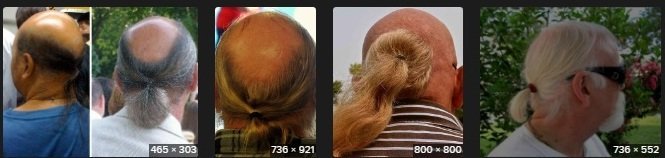
-
Money
-
Jeely

-
Yeah. There's loads of these type of clips on YT. Here's another
-
I don't normally click on "blind" links without knowing in advance what the link points to. Glad I made an exception in this case. Paul Rodgers & Joe Bonamassa - Fire and Water - one of my favourite Free tracks. Thanks @roo860
-
Paving
-
Foot
-
Stick
-
Thanks @gargamon I failed to notice the "HDTS" label in the title. Quality not as good as I like, so I will wait for a better non-cam version.
-
Thanks for the heads up @sharot724. It's on TPB & TheRARBG.
-
Your state pension can be paid directly into a Thai (or other foreign) bank account. You can also have it paid directly into tour Wise "account". DWP pay my SP into my Wise account.
-
ThoughtlessJeff Beck – Hi Ho Silver Lining (1967)My favourites are Cumberland thin & fatboy from either Prime or Manstons in Pattaya.eReaderBomb











Account
Navigation
Search
Configure browser push notifications
Chrome (Android)
- Tap the lock icon next to the address bar.
- Tap Permissions → Notifications.
- Adjust your preference.
Chrome (Desktop)
- Click the padlock icon in the address bar.
- Select Site settings.
- Find Notifications and adjust your preference.
Safari (iOS 16.4+)
- Ensure the site is installed via Add to Home Screen.
- Open Settings App → Notifications.
- Find your app name and adjust your preference.
Safari (macOS)
- Go to Safari → Preferences.
- Click the Websites tab.
- Select Notifications in the sidebar.
- Find this website and adjust your preference.
Edge (Android)
- Tap the lock icon next to the address bar.
- Tap Permissions.
- Find Notifications and adjust your preference.
Edge (Desktop)
- Click the padlock icon in the address bar.
- Click Permissions for this site.
- Find Notifications and adjust your preference.
Firefox (Android)
- Go to Settings → Site permissions.
- Tap Notifications.
- Find this site in the list and adjust your preference.
Firefox (Desktop)
- Open Firefox Settings.
- Search for Notifications.
- Find this site in the list and adjust your preference.