Digitalbanana
Advanced Member
-
Joined
-
Last visited
Everything posted by Digitalbanana
-
Where would the embassy keep him, in one of their cells?
-
They are still working on the algorithms at AI news school for a good story ending.
-
The AI algos need a bit a of tweak for the part where they generate reporters names.
-
Must all be Munger quotes. Here's another. “Remember that reputation and integrity are your most valuable assets—and can be lost in a heartbeat.”
-
Nothing here. Had my account a few years using Thailand as base.
-
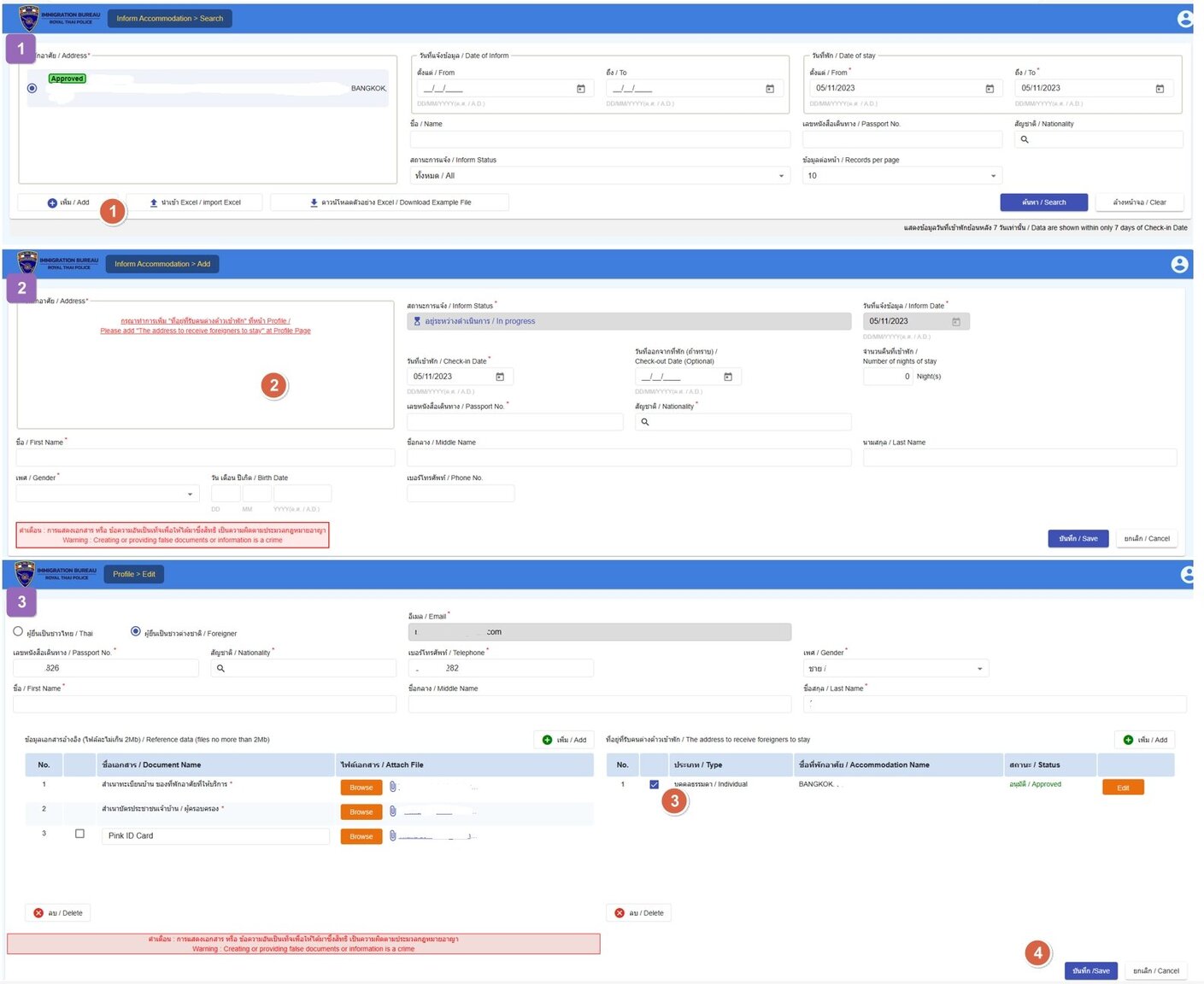
Of course it does, you can extend your balance it for 180 days or anything upto a year using the codes. You can use the codes from overseas as well.I think the main point of the news is that famed singer Unnop Thongborisut, better known as Por is safe.Some of us have been using the free YouTube since it first started and have until now never seen any ads Shopee or otherwise.The op said his purchase didn't fit. I am fairly certain, thought I could be wrong, they have more than one shop and one size on Lazada.My understanding is no data is available beyond the previous seven days. Not sure why, just to pee us off or is there a reasonable explanation. I have resorted to entering my data ONCE only and screen grabbing it for use anytime in weeks / years ahead.Whilst an interesting video from the op, reading some of his replies I can see why he lives out in the sticks.Exactly, and that is a price worth paying for me for the simple process of extending a Non O inside Thailand each year.Most of us use QR card-less withdrawals these days at ATM machines.For me it seems like a massive loose loose. The price of keeping 800/400k in a Thai bank on very low interest rates to extend a Non Imm O in Thailand annually far outweighs the PITA of getting retirement visas overseas and having to go thro Thai health insurance programs. Besides in years to come interest rates will fall overseas as well.I read the full article and I'm still none the wiser; nonsensical title. Perhaps Jonathan Head has resorted to ChatGPT to write his nonsense as well? Made no sense to me either.I seemed to already have gender in correctly when I reviewed my profile on the original home input, but as I was always getting the red text on the screen#2 above when trying the "Inform Accomodation > Add" option I had to go to profile and re do the whole home documents registration again, which was approved instantly so no one would have looked at it in person. Agree the web site is work in progress, and I think my problem was related to a web site update by them. The lack of back navigation from Profile page is really annoying, as one basically has to log in the site again to continue.Agreed, but in my instance I am only dealing with ONE property here and reporting it twice because the first approval from September now does not work and shows as a red text warning when trying to add a TM30. I got around it by submitted the address and documents (without pp second time) again so that I can now do TM30s also using the second of the two same addresses approved.Thanks guys and esp @Mutt Daeng who got me sorted. I was able to get around the red text issue by going to my profile and completely entering my house details and uploading all the house documents again? So now I have the house input twice and ONLY the second APPROVED address appears when I start a new TM30 submission which works and I was able to get a TM30 screen grab before it all disappears again in 7 days I expect. I think all in all this web site is worse user experience than the older one of a year ago or I am getting to old for this sht! Another thing I don't understand is when I resubmitted all the house documents again it only asked for tabien bahn and Thai ID which I uploaded, it never asked for my pp copy which I uploaded in Sept for the first approved address that I cannot submit TM30s on!
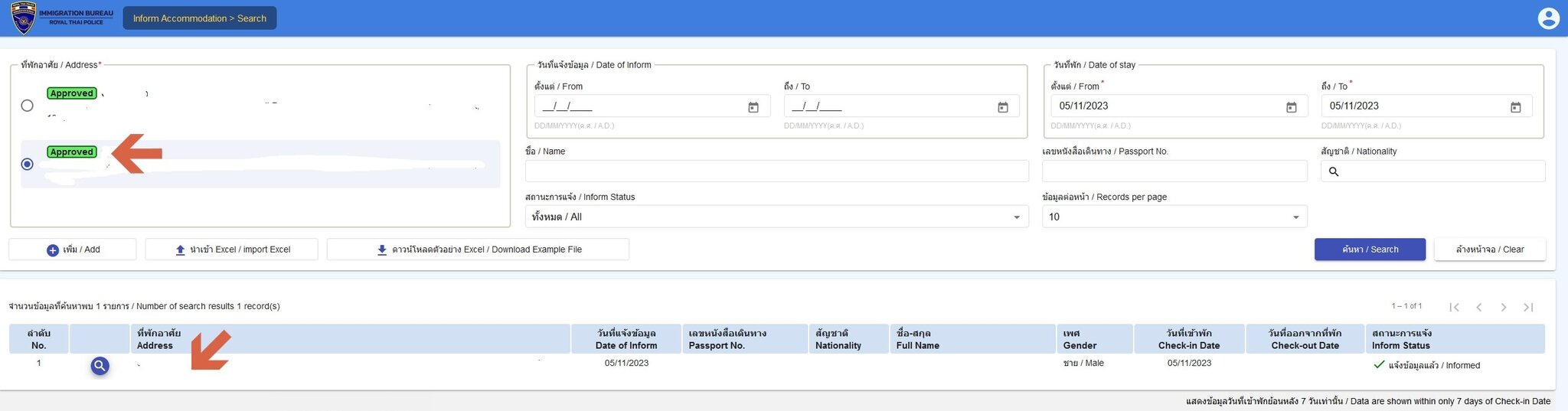 Yes I just want to add a TM30 to my approved address. If I do what you say I get the following screen which does not look like a new TM30 screen to me? It looks like the profile address I created mid Sept does it not?
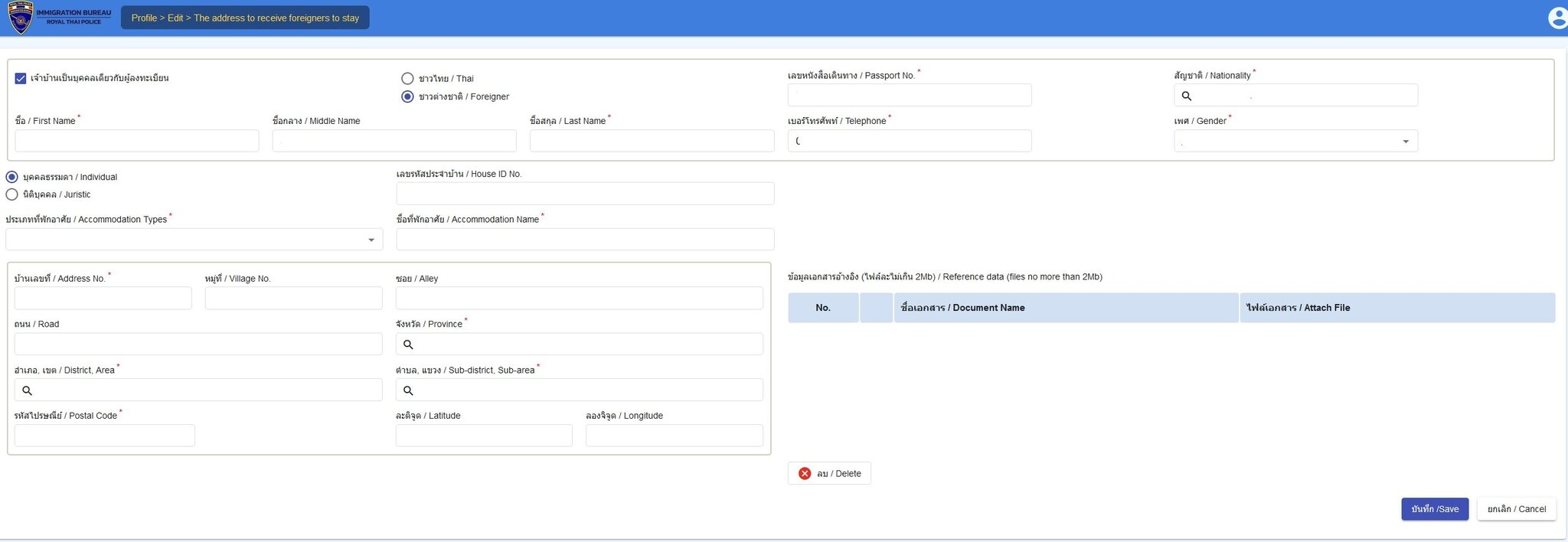 OK, I seriously gave this a try today and got nowhere - maybe its just me but it would help if someone explained what I am doing wrong thanks or whether the web site simply does not work? I went through THREE screens below (labeled 1,2,3 purple boxes). 1. Screen#1 "Accommodation > Search" now shows my approved address that I input during mid-Sept when this site opened. Back then there was no approved sign, now there is when I look 6 weeks later. If I press search my previous notification of staying at this address is NO DATA as it was done more than 7 days ago. So I don't know if they have my record or not, except I do have a screen grab from mid Sept as my own proof - no idea if that will be OK going forward though. If I press "Add" bottom (#1 on screen grab) it takes me to Screen#2 where I might hope to add a new entry of someone checking in at the address? 2. On the screen "Accommodation > Add" I am presented with the big RED message (#2) to add address. Isn't this supposed to ALREADY show the APPROVED address from screen#1 and I simply add the details on check ins and outs to the right of the screen? Without an address and the red message I cannot enter the check in details. So I press the red text link to add the address and it takes me to screen #3 (Profile>Edit). 3. On screen Profile>Edit screen is my existing Approved address data and documents I uploaded mid Sept but for some reason check box #3 is unchecked. I check it as I want to add check ins to this address but when I press button "Save" label #4 at the bottom NOTHING HAPPENS, I am just stuck on this page and no way to return to previous pages without closing the web site and logging in again?! Back to screen#1 and going around in circles.
 Same here at the moment with ITVx and Surfshark VPN, whereas BBC iPlayer works fine so I guess something up with the ITVx player?This is my exact situation. I think I will ignore this too as I have a screen shot of my previous entry on the new site.Does the site appear to be working normally to you? I would have thought by logging into that my previous entry of informed dates of stay at my own home would be visible in a table format - as I have kept a screen shot of previously, but there is nothing displayed now on the site and I just get 'DATA CANT BE FOUND' when I click on SEARCH for the Approved Address.