
Skip to content
View in the app

A better way to browse. Learn more.

ASEAN NOW

A full-screen app on your home screen with push notifications, badges and more.

To install this app on iOS and iPadOS
  1. Tap the Share icon in Safari
  2. Scroll the menu and tap Add to Home Screen.
  3. Tap Add in the top-right corner.
To install this app on Android
  1. Tap the 3-dot menu (⋮) in the top-right corner of the browser.
  2. Tap Add to Home screen or Install app.
  3. Confirm by tapping Install.

Thai holiday leads to GBP159,230 roaming bill

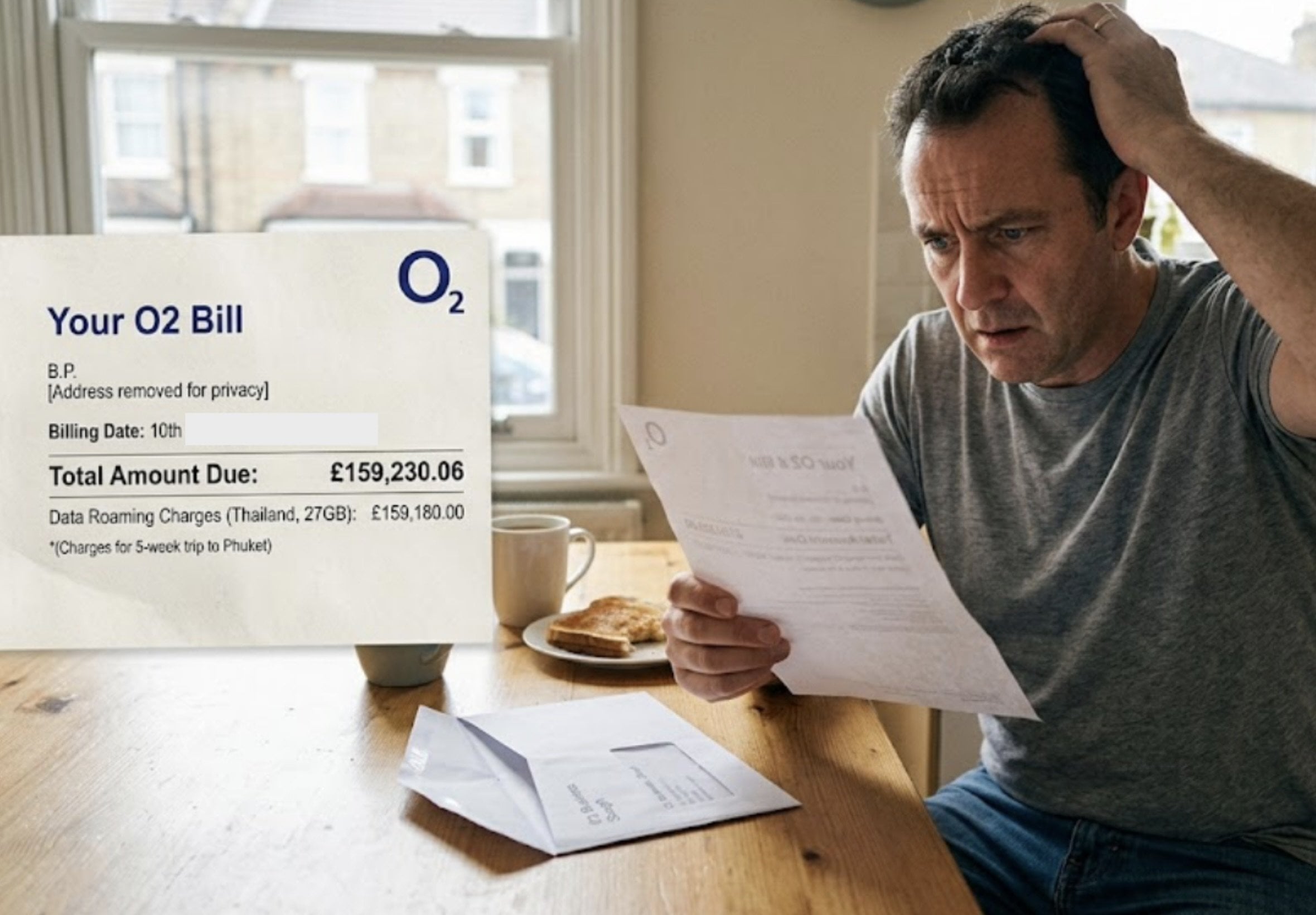
A London man returned from a five-week trip to Thailand in early July to find an O2 mobile bill for GBP159,230.06, after being charged for 27GB of data use.

The customer, identified only as B.P., said he believed he had arranged a GBP7.50-a-day roaming pass before travelling. After the case was raised with O2, the company agreed to remove most of the charge, leaving him to pay about GBP50 on top of his usual monthly bill.

He had travelled to Phuket, visiting landmarks including the Big Buddha and attending a health retreat where he trained in Muay Thai.

A six-day phone use brought a huge charge

B.P. said he only used his phone on six days during the trip because he was concerned about the cost of the daily pass. He believed the arrangement would let him use his normal allowance of calls, texts and data while abroad without additional charges.

On returning to Britain, he initially assumed the GBP159,230.06 bill was a billing error. O2 told him that it reflected 27GB of data use and that he was liable for the full amount.

The unexpected charge left him worried about the future of his plumbing and heating services business.

He said he had checked before departure, with ICE Comms, the broker which arranged his O2 contract, and had been assured that the roaming package was active. However, after repeated calls to both ICE and O2, he said neither company initially explained why the daily pass had apparently not been applied.

O2 finds no record of a spending cap

After the matter was referred to consumer protection columnist Sally Hamilton, O2 investigated. The company said it found no record of a request to apply optional spending caps to the account.

Within 24 hours, O2 agreed to clear almost all of the bill. An O2 Business spokesman said: "We always aim to do the right thing by our customers. As soon as this matter was brought to our attention, we acted swiftly to review the case, spoke directly with Mr P and reached a resolution he was happy with."

ICE Comms had not responded to enquiries, so it was unclear whether it had provided incorrect information or failed to action a request for daily passes.

What travellers to Thailand should check

For foreigners travelling to Thailand, particularly those relying on a UK or overseas contract, the case is a reminder to confirm roaming passes, data limits and spending controls directly with the mobile provider before departure.

O2 said customers should regularly check account settings and spending controls, particularly before travelling, to avoid unexpected charges. Travellers can also limit mobile roaming to essentials such as navigation, use free Wi-Fi where available, or consider a local physical SIM or an eSIM plan if their handset supports it.

Join the discussion? Create account. orange.png


image.png

13 August 2026

User Feedback

Recommended Comments

MIke B Bad Gold Member

MIke B Bad

Advanced Member

Having had various run-ins with mobile phone operators.......this seems well out of character..........strange.

MIke B Bad Gold Member

MIke B Bad

Advanced Member

I wonder if he was somehow trying to use his phone to pay for lady drinks and there was a mix up of some kind?

wavodavo Gold Member

wavodavo

Advanced Member

Just now, geisha said:

I would have thought that any person adult who has done minimum travel would know how to use their phone abroad without running up huge bills ? Best is to turn it off as soon as you get on that plane and use only hotel/ cafe/restaurant WiFi’s. And in Thailand at least there is constant advertising for tourist sims as soon as you get off that plane. He has his own business?

MR.BP should change his name to DW .. MR. Dim Wit. you gotta wonder how his plumbing and gas fitting business is going if he can't even understand the conditions of his mobile phone plan before going overseas.

unblocktheplanet Star Member

unblocktheplanet

Advanced Member

When cellphones were brand-new and all, I bought a $4k Mororola brick. Drove across the continent bringing my daughter to her first year...only to discover 800-number calls were not free!

WHansen Silver Member

WHansen

Advanced Member
(edited)

For those criticising the bloke.... he arranged a £7.50 a day roaming agreement. He did the right thing, the companies involved screwed up and waved the charges.

Experienced travellers know buying a local sim is way cheaper than purchasing a roaming agreement from your home network.

Edited by WHansen

SingAPorn Gold Member

SingAPorn

Advanced Member

Have people not yet understood how all the telecom neworks are scamming customers in the international roaming rates ? Or do they not know how to disable the roaming when traveling abroad ? Time to see how to do it if not. A bit like all those banks that cheat customers on the ATM withdrawl fees and crappy exchange rates. Always buy a local sim and turn ON your home smartphone only with wifi available and keep the roaming disabled.

Paris333 Silver Member

Paris333

Advanced Member
(edited)

There is a big misunderstanding about the concept of roaming in phone calls.

Roaming is cheap for European citizens only when they make phone calls from abroad to their own country.

When they are abroad making phone calls from their phone to mobile number in a foreign country then their charges increase.

I always buy Thai sim card when I visit Thailand in order to reduse my cost (almost all mobile phones have tree -four sim slots to install) and I have stopped roaming in my mobile phone not only if I am going to visit Thailand but also when I am going to visit E.U States allthough I hate to visit E.U countries.

European Union is not a liberal democracy Union but the mirror of Soviet stalinism communism Union. Stalino fascists!

Edited by Paris333

scottiejohn Star Member

scottiejohn

Advanced Member
2 hours ago, WHansen said:

he arranged a £7.50 a day roaming agreement.

He claims he did that but both companies involved state that they have no knowledge of any such request/setup!

scottiejohn Star Member

scottiejohn

Advanced Member
(edited)
40 minutes ago, Paris333 said:

There is a big misunderstanding about the concept of roaming in phone calls.

Roaming is cheap for European citizens only when they make phone calls from abroad to their own country.

I know the UK is in Europe and it is not in the EU!

By European Citizens do you mean all of them or only those in the EU?

In other words, do your comments apply to UK citizens?

Edited by scottiejohn

daejung Gold Member

daejung

Advanced Member
39 minutes ago, Paris333 said:

When they are abroad making phone calls from their phone to mobile number in a foreign country then their charges increase.

That is not correct.

Within the EU, roaming is not limited to calls to your home country. If I have a French mobile plan and I am travelling in Italy, for example, calls from Italy to France, Italy, Spain, or another EU country are covered by my French plan under the EU “Roam Like at Home” rules. It is not necessary for the number I call to be French.

Of course, this does not apply to Thailand or other countries outside the EU, where roaming charges can indeed be very expensive.

treetops Ruby Member

treetops

Advanced Member
On 8/12/2026 at 11:37 PM, jacko45k said:

The fact he could run up such a huge debt without warnings or suspension of service also is questionable.

It was a business account where they're not obliged to give these warnings or apply data caps in the same way they are for standard consumer accounts.

Create an account or sign in to comment

Account

Navigation

Search

Search

Configure browser push notifications

Chrome (Android)
  1. Tap the lock icon next to the address bar.
  2. Tap Permissions → Notifications.
  3. Adjust your preference.
Chrome (Desktop)
  1. Click the padlock icon in the address bar.
  2. Select Site settings.
  3. Find Notifications and adjust your preference.