




DrJack54
Global Moderator
-
Joined
-
Last visited
-
Currently
Viewing Topic: Thailand Multi-Entry Tourist Visa Requirements
Everything posted by DrJack54
-
You can however suggest that the owner should do it. Here is thread with info doing TM30 yourself. https://aseannow.com/topic/1329072-tm30-notification-of-stay-done-by-yourself/
-
Opposite for me. Also the Thai partner has 5 rentals. Currently two have farang. She does TM30 for the non Thai tenants when requested. Also for when they have non Thai staying with them.
-
Watchin TV
-
The owner of place you are moving to will/should do a TM30. Ask about the TM30 prior to renting. It's a very simple thing for owner to complete. https://tm30.immigration.go.th/tm30api/loginExternal.jsp?value=EXT&id=74e3364697e4aa799c0c998cd81bd821
-
For using money in bank method there is no requirement for funds from abroad. For income method (retirement) funds must be international monthly transfers. That's exactly how it works. Most will say she can withdraw the funds. I'm not so sure.
-
Surely this one was written in Thailand.
-
Asked because CW is now requesting bank book + update to check financial compliance. It never was a requirement in the past. I was fortunate that when I did the transfer I just happened to have my bank books.
-
That won't be an issue. Which immigration office for transfer
-
That's exactly what I would do if married. As you point out having the 400k in bank account in your name for only couple of months is a good bet. Also married guys should be aware that its an option to have wife as signatory on your bank account. Works for immigration. Not possible for a gf
-
The OP is looking for option that meets his financial compliance for extensions retirement. Joint account not allowed.
-
"Opportunity Cost" is basic economics 101. It's not an Australian term. Basically it's the loss involved in one financial option compared to another. Keeping 800k in a Thai bank at ~ 1% has a cost. Those funds could earn much more in eg shares etc. That is one significant reason some folk opt to use an agent.
-
OP, where are you currently located. Can't get my head around the plan to enter Thailand with a Non O then exit for holiday in Oz. Why not obtain the Non O later. Yes you can obtain a reentry permit for the period of the 90 day permission of stay.
-
Nice Rant.. In reality some folk opt to use agent for loss of opportunity cost. I'm stupid that's why I do not use agent. I opt to lose the 8%+ my Oz super fund would yield.
-
Trolling post removed along with reply.
-
The German officer was wrong.
-
It's a common thing to travel with both old and new passports. And valid visa, reentry permit, etc in old pp remain valid even when pp is cancelled. The airlines are aware of this. Just have your eVisa print out and old pp with you.
-
To change from funds in bank method to income method then you need to run both methods in concert. Meaning do both for one year. I'm currently doing that. Maintain 800k + in Thai bank and ALSO doing monthly transfers of 65k+ . In October I will attend immigration and show compliance with money in bank and also 12 monthly transfers. From then on will use income method and the balance in my Thai account minimal.
-
Yes reentry permit. You can obtain at immigration office. Remember to provide photo. Here is link to form. Print it back to back (one page) The 90 report will NOT come into play. https://www.diald.nu.ac.th/download/International Service/Overseas Staff/05 Re-Entry Permit/Form TM.8.pdf
-
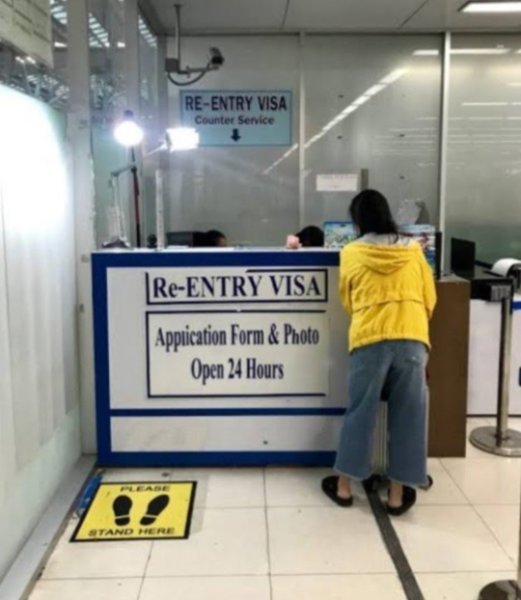
At BKK the reentry permit desk is prior to going through passport control. It's just to the left of pp lines. Zone 2 At DMK reentry permit desk is just after passport control. Both airports offer a 200b optional service fee of providing TM8 Photo etc. You just hand over pp. Single entry 1000b Multiple 3800. + optional service fee Attached pic BKK.
-
Some immigration offices do a 90 report for you when you apply for annual extension. In reality 90 report is only relevant for First Extension. After that not connection. At CW for example you would do the extension and then do the report. Different desk. BTW never rely on reminded emails. Keep track of your own report due date. Phone calendar good option.
-
Off topic posts, and replies removed
-
This is exactly what I'm currently doing for exactly same thinking/reason as the OP. In fact I have the monthly 14 of each month. 100k will hit my Thai bank on Monday. Straight away that amount goes into Thai partners account.. No Will. No assets in my name. Note: fixed the typo. It's 65k/month not 60k
-
OP, why not use income method for immigration financial requirements. Some poor advice (IMO) in this thread. Since it seems that your only assets is the money in your bank then using incocome method will solve the problem Not married she cannot be signatory on your bank account. You could make a Thai will separate from your home country Will (messy) Do not rely on her accessing your bank account after you pass. Illegal.
-
Enough from me. You seem to be playing games with your threads. Now you state that you have a wife (assume Thai) It would be unusual to obtain extension based on support of Thai child if you were still married to the mother. Not aware of immigration office that would allow that. Don't find your threads credible.
-
Valid point, however goes without saying always check any public holidays for planning dealings with immigration both in Thailand and outside.






