




Crossy
Global Moderator
-
Joined
-
Last visited
Everything posted by Crossy
-
Is this your home or a rental?? If a rental get the landlord to sort it!
-
Get one of them in to have a look. And then ask them to fix it if they don't run away screaming!!
-
He was probably wearing boxing-gloves too.
-
Sorry. without being there I really can't say what is going on. WIRE COLOURS MEAN NOTHING!!!!! For all we know he's used brown for earth. Do you have any test gear (a simple multimeter would do)? A neon screwdriver would also be handy. Seriously, you need to get a man in before someone dies or a conflagration starts. Try talking to your local PEA/MEA office, many of their chaps are not averse to a bit of moonlighting and they are likely to be decently competent.
-
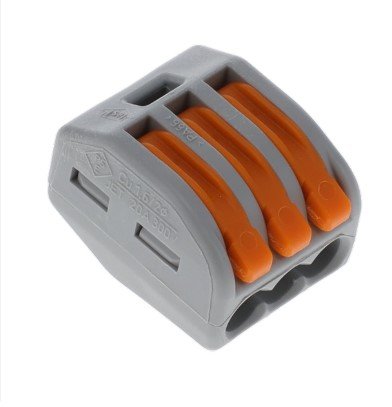
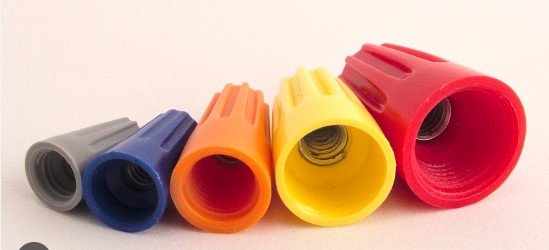
As a Brit I would use Wago connectors. Failing those, wire nuts (not permitted in the UK)
-
A complete mess! If you are getting shocks, time to turn off at the mains and get a competent sparks in!!!!!!!!! Is there a ground rod anywhere? Where is it connected to??
-
Wire colours mean nothing! You won't (ok shouldn't) get shocks from the neutral, but if you install an RCBO with the box as it appears to be wired then it won't stay switched on. But I see a lot of grey wires on what is supposed to be the ground bar, and green/yellow wires on what is supposed to be the neutral. Working out exactly what is going on is nigh on impossible from a photo, you need to be hands-on with some basic test gear. The only way to be certain is to disconnect everything, and with the power off of course buzz-out (meter, bulb and battery) the neutrals from each circuit. Whilst you are at it those taped joints have to go!!! Particularly the one connecting a brown and blue (what did I say about wire colours).
-
This ^^^ BUT!!! The bar to the left of the incoming breaker should be the NEUTRAL. The bar at the top which is bolted to the case should be the EARTH/GROUND. Wire sizes need to be checked. I also note that there is no earth-leakage protection (as a minimum an RCBO incoming breaker), this is a vital safety feature. IMHO It's a total mess, I recommend getting a competent sparks in and re doing the whole shebang (with emphasis on the "bang")!
-
1967: Tomorrow's World takes hearing protection to a whole new (decibel) level with an explosive test of a pair of newly developed 'ear defenders'. Don't try ANY of this at home - AQNfmkOXLXk_P1clDGhPkPY1ABnZ6-iUbVa7XQX-8IsqIrjxmD826O7xHXafcUcRfzwUPiwLl1YqDDZtq5tW2-cD.mp4
-
Happy birthday to James Burke (remember Connections?), the man responsible for the most perfectly timed shot in television history! Definitely no Take-2!!! https://en.wikipedia.org/wiki/James_Burke_(science_historian) AQOG9CCuij1kEAXbOqYCSQ88k5BY17qobC2khY2CLG3BLmJRGyLGwg7D_9DdzX3Wf_6Nd3MzWG8DQMPz_dRDJbgr.mp4
-
POTY really lost its appeal when the software was updated to prevent people from changing their votes 😞 I do note that other fora have polls where the vote can be changed, I wonder if there's an option on the Invision software. Have to check with Admin.
-
Does it have a manual "pop-up" button? Does it work? Have you emptied the crumb-tray? Checked that the mechanism isn't obstructed by an errant bit of bread?
-
There is a way to get your wallet contents (even if you "don't have a wallet") into your bank, but it's slow and long winded, how to do it is explained in the email you get confirming your refund. It's one of the disadvantages of using COD. Paying by credit card means you get refunds to the card, it's also not exactly quick but it does work.Can you look at the normal pump, should be a rating plate, or the solar panel(s)?What voltage and current are your pumps? I assume they are DC pumps. Could you DIY an extension to the handle to make operation easier??No tracking info was forthcoming (quelle surprise)! So, item is awaiting pickup for return and refund. Hopefully, refund will be without problems.Only unpacking photos 😞 He does have Lazada chat records saying it will be delivered before Wednesday.Try this: - You can repair Windows 7 and fix corrupt files without a CD/DVD by using the built-in System File Checker (SFC) tool and the Deployment Imaging Service and Management Tool (DISM). Here’s how to do it: Using System File Checker (SFC) Open Command Prompt as Administrator: - Click on the Start menu. - Type cmd in the search box. - Right-click on Command Prompt and select Run as administrator. Run SFC Command: - In the Command Prompt, type the following command and press Enter: sfc /scannow - This process will scan all protected system files and replace corrupted files with a cached copy. It may take some time to complete. Review the Results: - After the scan is complete, you will see a message indicating whether any issues were found and if they were fixed. Using DISM (if SFC fails) If SFC doesn’t fix the issues, you can use DISM to repair the Windows image. Open Command Prompt as Administrator: - Follow the steps above to open Command Prompt as an administrator. Run DISM Command: - Type the following command and press Enter: DISM /Online /Cleanup-Image /RestoreHealth - This command will check for component store corruption and repair it. It may take some time to complete. Run SFC Again: - After DISM has completed its process, it’s a good idea to run the SFC scan again: sfc /scannow Additional Steps Check for Windows Updates: Sometimes installing the latest updates can resolve underlying issues. Use System Restore: If you have restore points set up, you can restore your system to a previous state where it was functioning correctly. Access this via Control Panel > System and Security > System > System Protection. Note If these methods do not resolve the issues, you may need to consider more advanced recovery options, such as using recovery software or reinstalling Windows 7, which typically requires installation media.Noooooooooo!! On second thoughts, if he's over there he's not in DIY!!













Account
Navigation
Search
Configure browser push notifications
Chrome (Android)
- Tap the lock icon next to the address bar.
- Tap Permissions → Notifications.
- Adjust your preference.
Chrome (Desktop)
- Click the padlock icon in the address bar.
- Select Site settings.
- Find Notifications and adjust your preference.
Safari (iOS 16.4+)
- Ensure the site is installed via Add to Home Screen.
- Open Settings App → Notifications.
- Find your app name and adjust your preference.
Safari (macOS)
- Go to Safari → Preferences.
- Click the Websites tab.
- Select Notifications in the sidebar.
- Find this website and adjust your preference.
Edge (Android)
- Tap the lock icon next to the address bar.
- Tap Permissions.
- Find Notifications and adjust your preference.
Edge (Desktop)
- Click the padlock icon in the address bar.
- Click Permissions for this site.
- Find Notifications and adjust your preference.
Firefox (Android)
- Go to Settings → Site permissions.
- Tap Notifications.
- Find this site in the list and adjust your preference.
Firefox (Desktop)
- Open Firefox Settings.
- Search for Notifications.
- Find this site in the list and adjust your preference.