

Upnotover
Advanced Member
-
Joined
-
Last visited
Everything posted by Upnotover
-
Amritsr, beach road, next to TQ
-
Go to the 3rd button and click it, then you can change stuff... (actually the 4th switched light and dark)
-
That's not going to work unless he leaves and returns and then applies for it with 800k in the bank.
-
No. "Certificate Of Residence". Not the same thing. But beware, those with PR have a CoR which is another thing altogether. Actually some (all?) offices actually refer to it as a "Letter of Residence".

-
Not so sure about that. Airlines report departures to immigration (UK) so much better to check in with the UK passport as that's what he will arrive on. That will then match the information given when booking the ticket (if applicable). If the airline has an issue just wave his Thai passport at them.
-
That's because if your friend had completed it correctly it is already on the IO's system. So it's working. You only have to complete it, not show it.
-
Seems you're barking up the wrong tree asking here, or meowing in fact.
-
My QR scan limit is 5000 and I can't increase it. Tap to Pay limit is 1500.
-
Correct. I had to go into True to correct a single character typo in my record.
-
Sounds like you may have a problem, the solution to not being able to log in is to log in and change stuff. You're in a loop!
-
You could try the web version but as mentioned they are shutting that down soon and might not be easy to access, especially if you never registered for it previously. Anyway, with luck they will respond to your contact soon.
-
How do you access your account, app or web? Make sure your Thai phone number is registered in your name. In any case you are going to need to contact the bank, several ways to do so, I have found the banks very responsive to customer service issues, 100% opposite to UK banks. https://www.krungsri.com/en/support/contact-us
-
Aside from using cash you can use your Thai bank account and QR scan, same as you (maybe) do in Thailand.
-
That's a bit harsh. Not everyone is in the same financial position and I'm sure if there were funds available they'd be on their way already. Nevertheless hopefully your advice proves to be the case and the extension is stamped without further ado.
-
Highly doubtful but I can't say for sure. But I'll be doing the same in this current year so I'll remember to update something in April next year😅
-
No, they will not ask where the money came from.
-
That also works here, although not every merchant has a machine for it. Wave your card (or phone) at them and say "TAP". Then do exactly the same as you did in the UK.
-
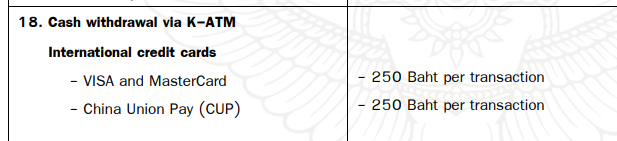
Kasikorn as of today....
-
You can still book flights from Bangkok to Australia after Jetstar Asia finishes at the end of this month. The flights are operated by Jetstar Airways.
-
USA passport, needs a visa.
-
Who does he "borrow" the money from?
-
Yes you are, but not a Taiwanese one.
-
2022. Not now.
-
Just out of interest, most people needing a 90 day report don't have a "valid Thai visa", rather they have an extension of stay, is that what you refer to?
-
My apartment downloads it from the website.