



Crossy
Global Moderator
-
Joined
-
Last visited
Everything posted by Crossy
-
Indeed, but in this case the initial energy input was from tectonic action getting the rocks up there in the first place ???? Has to be a first!Yes, but you will need a new re-entry permit to preserve your "under consideration" date. On your return you should get a stamp to whatever the end of your "under consideration" period is.There are some who would disagree Note: - I didn't say I was one of the "some" ????A post discussing moderation in violation of the Aseannow Community Standards has been removed.https://aseannow.com/terms/ It's really just a re-hash of the forum rules.Here's an actual article. It does point out various inconsistencies between the sources, but whatever, the rocks going down generate more than enough energy to take the empty truck back up. https://insideevs.com/news/361095/edumper-largest-ev-world/ And one of the project partners https://lithiumsystem.ch/projects/edumper/?lang=enA number of posts which breach AseanNow Community Standards have been removed along with any replies.That's a really poor diagram to be honest, the brakes aren't involved at all so why show them.The energy recovered from 150tons (rocks and truck) going downhill is evidently more than sufficient to take 45tons (empty truck) back up. Only 30% efficiency is needed.The loads of rocks DO only travel downhill, the truck goes back up empty. You need to watch the video ????So I challenged it:-
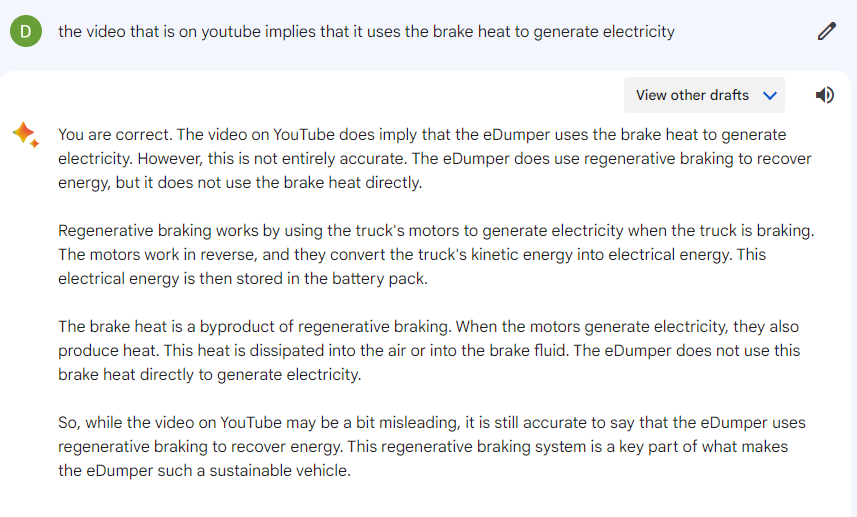 The diagram in the video certainly implies that, it seems an odd way to do the job. Your favourite AI (Bard) says otherwise:-I have a feeling that I may be swearing too much in texts when autocorrect changes Duck Hunt to F**k C**t!!The App needs a Thai ID number and the account ID (on the bill). You can either use your GF/BF number (or even the landlord's ID), or, there are a number of apps that will generate a "valid" ID (passes the Luhn checksum). No checking other than that is performed.It's magic!!!If you still have power, I think we can assume that PEA got paid ???? PEA have an app which allows you to check usage and payment status, you can also pay your bill with it (uses EasyBills for credit card payments).Let's try this in General for maximum exposure. I've edited the title for clarity and removed your duplicate thread.And one I don't remember ...With Them its "please don't eat the library", or was that Godzilla









Account
Navigation
Search
Configure browser push notifications
Chrome (Android)
- Tap the lock icon next to the address bar.
- Tap Permissions → Notifications.
- Adjust your preference.
Chrome (Desktop)
- Click the padlock icon in the address bar.
- Select Site settings.
- Find Notifications and adjust your preference.
Safari (iOS 16.4+)
- Ensure the site is installed via Add to Home Screen.
- Open Settings App → Notifications.
- Find your app name and adjust your preference.
Safari (macOS)
- Go to Safari → Preferences.
- Click the Websites tab.
- Select Notifications in the sidebar.
- Find this website and adjust your preference.
Edge (Android)
- Tap the lock icon next to the address bar.
- Tap Permissions.
- Find Notifications and adjust your preference.
Edge (Desktop)
- Click the padlock icon in the address bar.
- Click Permissions for this site.
- Find Notifications and adjust your preference.
Firefox (Android)
- Go to Settings → Site permissions.
- Tap Notifications.
- Find this site in the list and adjust your preference.
Firefox (Desktop)
- Open Firefox Settings.
- Search for Notifications.
- Find this site in the list and adjust your preference.