




Crossy
Global Moderator
-
Joined
-
Last visited
Everything posted by Crossy
-
We used one of the pre-approved drawing sets from the local ampur office, they have books of them. Find something similar to what you want and adjust the drawings by hand. So long as you don't change the structure then no further $$$ needed ????
-
The headline is somewhat misleading, there's nothing "covert" about it. Decidedly overt!
-
Every. Single. Time. ????
-
I use Ivacy based in Singapore, responsive support, works for the BBC etc. etc. Best offer comes out at around USD 1 per month, pretty close to free ????
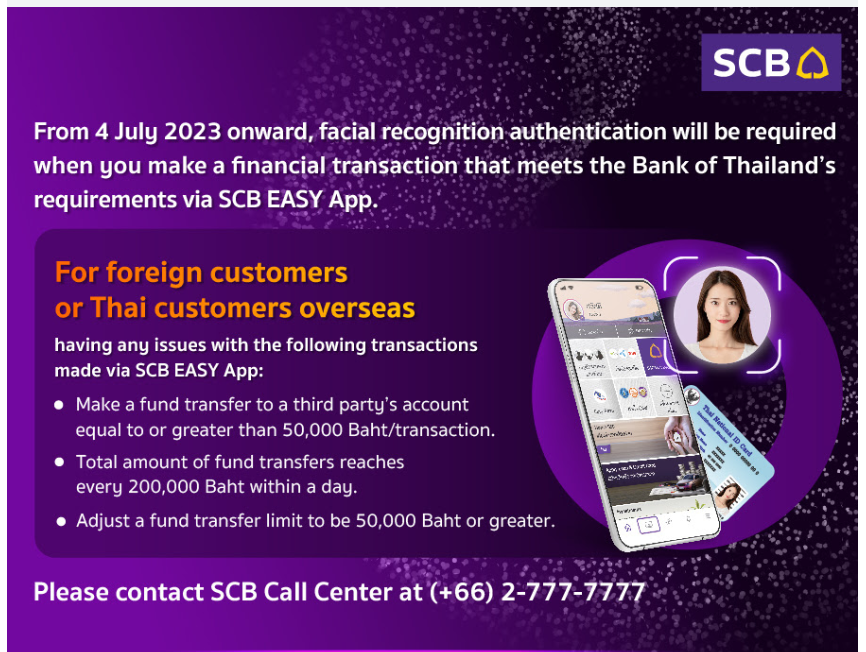
 Got the "approved" text at 6.30 this morning. We shall see how well it works when I next send Madam her housekeeping (ok it's the mortgage money as well). Meanwhile, Bangkok Bank app says I can go to any branch with my passbook to do a photo (but I'll still need to update my PP I suspect). Domestic transfers are currently limited to 50k but it also says that international transfers are 200k THB per day.And the "no shirts" don't forget them!Update on the Bangkok Bank issue. I've decided I don't need a new card, at least for now. When I got my new phone, I tried to activate the app and it wanted my card number, old number wouldn't work (expired), so I shelved the idea. Fast-forward to an hour ago. I just did an update to the app and this time it gave me the option of using my online banking credentials, which worked. It is now telling me I have an online transfer limit of 200,000 Baht, no mention of facials ???? We shall see next month when I send my $$$ to the UK.Could well be, but I've got new passbooks with new PPs at that branch in the past. It's no real pain, my home branch is close to the BTS, I'll just take a wander when I don't have a meeting. I could be some time!Not sure if it's pertinent, but I also have a new PP, but that's been no issue in the past. OP edited for clarity.Certainly for SCB, PC app is dying this month. Meanwhile in Bangkok: -Update - Missed this earlier thread in the Pattaya forum: -Part 1 Many of us will have received this email from SCB. So, today since I'm not in the office due to getting my Work Permit medical (which was quick and easy) I headed off to our local SCB branch with Madam in tow due to little English being spoken by the bank staff. Note, we are not in the boonies, this is still in Greater Bangkok. Showed the girlie on the door the email, she gave me a number and pointed us towards a desk with bank staff, showed him the email and he understood what was needed. So Far So Good. He then spent a while on the phone (to the call centre it turned out), then handed me the phone. I spoke to a nice gentleman at the call centre who asked what I wanted to do "I need to do the facial recognition for the app", "Ah, are you in an SCB branch (yes) I'm not sure why they called me, let me talk to the bank staff again". More talking on the phone. OK, back to my friend in the call centre: - "The staff tell me you want an exemption from the facial recognition". "No. I want to do the photo so the app will let me transact over 50k Baht please". "Ah, SCB have no mechanism to do this for foreigners! We can only offer an exemption". (see the above email!) "OK, let's do that then". "I must warn you that any illegal transactions will be your responsibility". "Fine by me". He checked my phone number was correct and asked for the last 4 digits of my ATM card, then transferred me to the automatic system where I entered my PIN. Back to my friend again: - "OK (checking my number again), headquarters will be in touch by SMS when it is approved in 2 or 3 business days". Phone hung up. "OK, thank you very much", wais exchanged all round. Exit stage left. Waited until we were in the car before showing that I was "a little miffed"! Part 2 OK, off to our local Bangkok Bank with visions of doing the same there. Note that this isn't my "home" branch, but I've got several new passbooks and changed my passport number there several times over the years. I need a new ATM card as the old one is expired (we never got to the facial recognition bit). Lots of wandering around and phone calls. Eventually, "We don't think we can do it here, you need to go to your home branch, or we can open a new account. We will call headquarters and get back to you". EDIT Not sure if it's relevant but I also have a new PP, maybe they fall over if two things need doing. Just got the call, "Have to do at home branch". Hopefully it still exists. To be Continued!!!
 Yup, this issue I know, long ladders and lamps that last 1,000,000 years needed ????This is a good point, most of us are assuming we are talking about Edison-screw lamps not fluorescent replacements!OK. They "should" just work, but ... Are these mains (230V) or low-voltage (12V) lamps? Do your LEDs work in bedside lamp or similar? If you put a conventional lamp in place of the LED does it work? Are you using dimmers?So it would suck, just like most politiciansIf it's a fan with a capacitor then a replacement cap is a cheap and easy fix ????No, you cannot simply add a capacitor, it needs a second winding too ????My private pension (I'm not getting my UK state pension yet) will send life certificates by post if you want them. But, they encourage you to use their app "MyPensionID". Once it's set up (not difficult) and they want to prove you're still breathing they send you an email and the app puts up a notification. Open the app take a selfie with the app during which you blink. After a short while it tells you OK or try again. All done.Yeah, a single-phase induction motor will sit and hum (it's actually going forwards and backwards 50 times a second) unless it gets a bump in one direction whereupon it will continue to run in that direction. What you have appears to be a ratchet / one-way device which bounces it in the right direction. I had a clock long ago which used the same idea, when it failed the clock would randomly start running backwards. You may struggle to replicate its action; I'd probably just continue to start it manually.






Account
Navigation
Search
Configure browser push notifications
Chrome (Android)
- Tap the lock icon next to the address bar.
- Tap Permissions → Notifications.
- Adjust your preference.
Chrome (Desktop)
- Click the padlock icon in the address bar.
- Select Site settings.
- Find Notifications and adjust your preference.
Safari (iOS 16.4+)
- Ensure the site is installed via Add to Home Screen.
- Open Settings App → Notifications.
- Find your app name and adjust your preference.
Safari (macOS)
- Go to Safari → Preferences.
- Click the Websites tab.
- Select Notifications in the sidebar.
- Find this website and adjust your preference.
Edge (Android)
- Tap the lock icon next to the address bar.
- Tap Permissions.
- Find Notifications and adjust your preference.
Edge (Desktop)
- Click the padlock icon in the address bar.
- Click Permissions for this site.
- Find Notifications and adjust your preference.
Firefox (Android)
- Go to Settings → Site permissions.
- Tap Notifications.
- Find this site in the list and adjust your preference.
Firefox (Desktop)
- Open Firefox Settings.
- Search for Notifications.
- Find this site in the list and adjust your preference.