



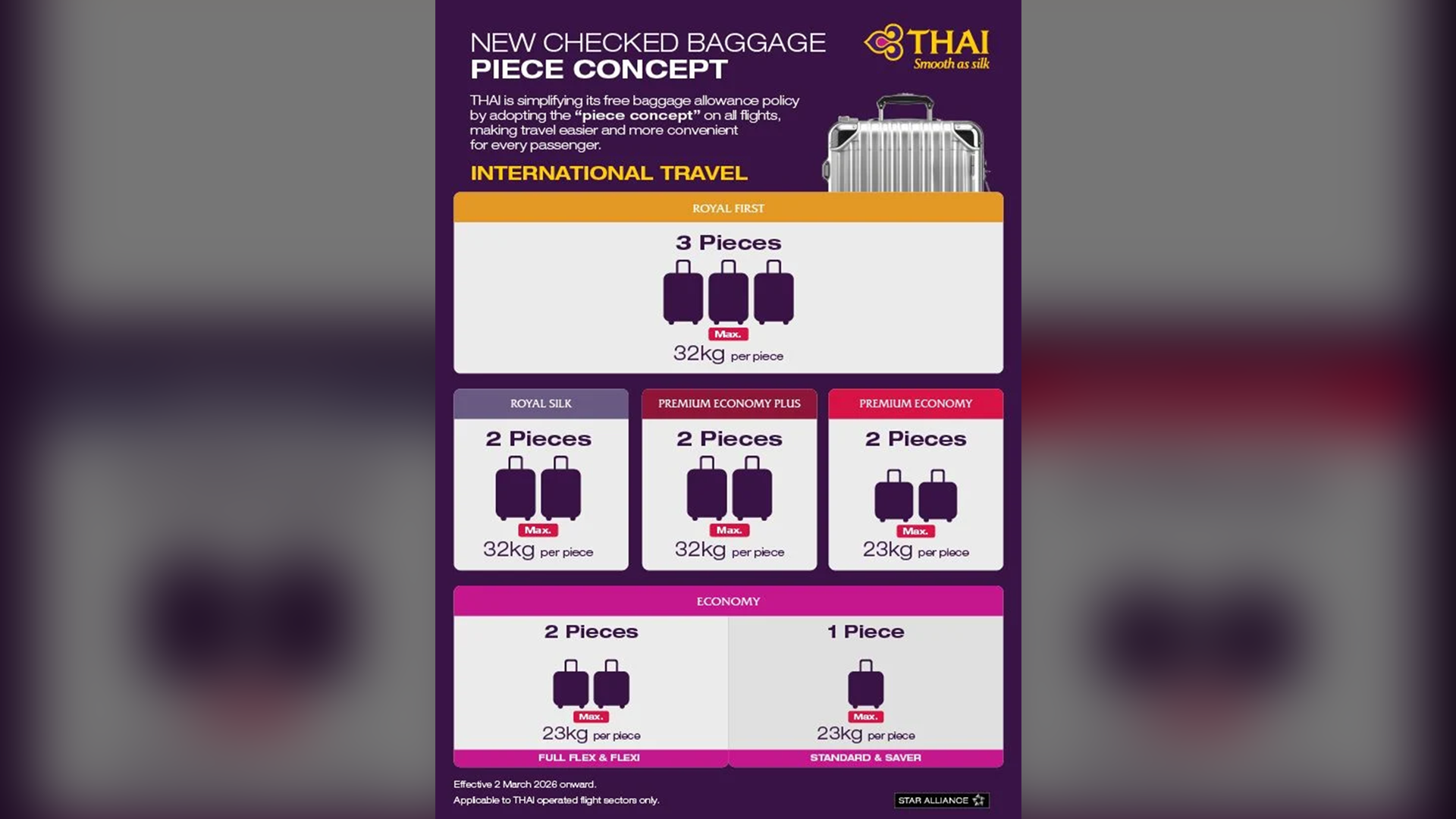

A clarification was issued following significant delays at Suvarnabhumi Airport due to a Thai Airways check-in issue on March 2. The problem arose when Thai Airways implemented its new "Piece Concept" baggage policy, limiting the number of items passengers could check in. This change disrupted the self-service check-in system, causing passengers to face long queues.
Get today's headlines by email 
The delays occurred when Thai Airways' self-service system failed to print baggage tags as expected. Despite successful tests prior to the launch, the system malfunctioned once the new policy was live. As a result, passengers who used the self-service machines still needed to process baggage at staffed counters.
Both domestic and international flights were impacted, leading to significant wait times for travelers. Thai Airways is currently working with the system developer to fix the issue and ensure the new baggage rules are fully supported. The airline aims to restore normal operations swiftly to minimize further disruption.
In response, the airport has coordinated with Thai Airways to deploy additional staff to assist passengers and manage congestion. Passengers are advised to arrive earlier than usual and monitor airline updates to mitigate potential schedule interruptions. The airport remains focused on reducing traveler inconvenience during this transitional period, reported The Thaiger.
Join the discussion? 
Already a member? 
 Adapted by ASEAN Now · The Thaiger · 04 Mar 2026
-
 4
4